Spark has managed to attract one million users on iOS and macOS over the years. But every time I’ve written about Spark, I’ve received many comments asking when the app would be available on Android. The answer is today.
Spark is an email client developed by Readdle, the company behind many popular productivity apps, such as PDF Expert, Scanner Pro, Calendars 5 and Documents. With email, the company is tackling a much bigger industry dominated by giants, such as Gmail and Microsoft Outlook.
That’s why Spark focuses on power-user features, customization and collaboration. The app is available for free and you can optionally pay to unlock more collaborative features.
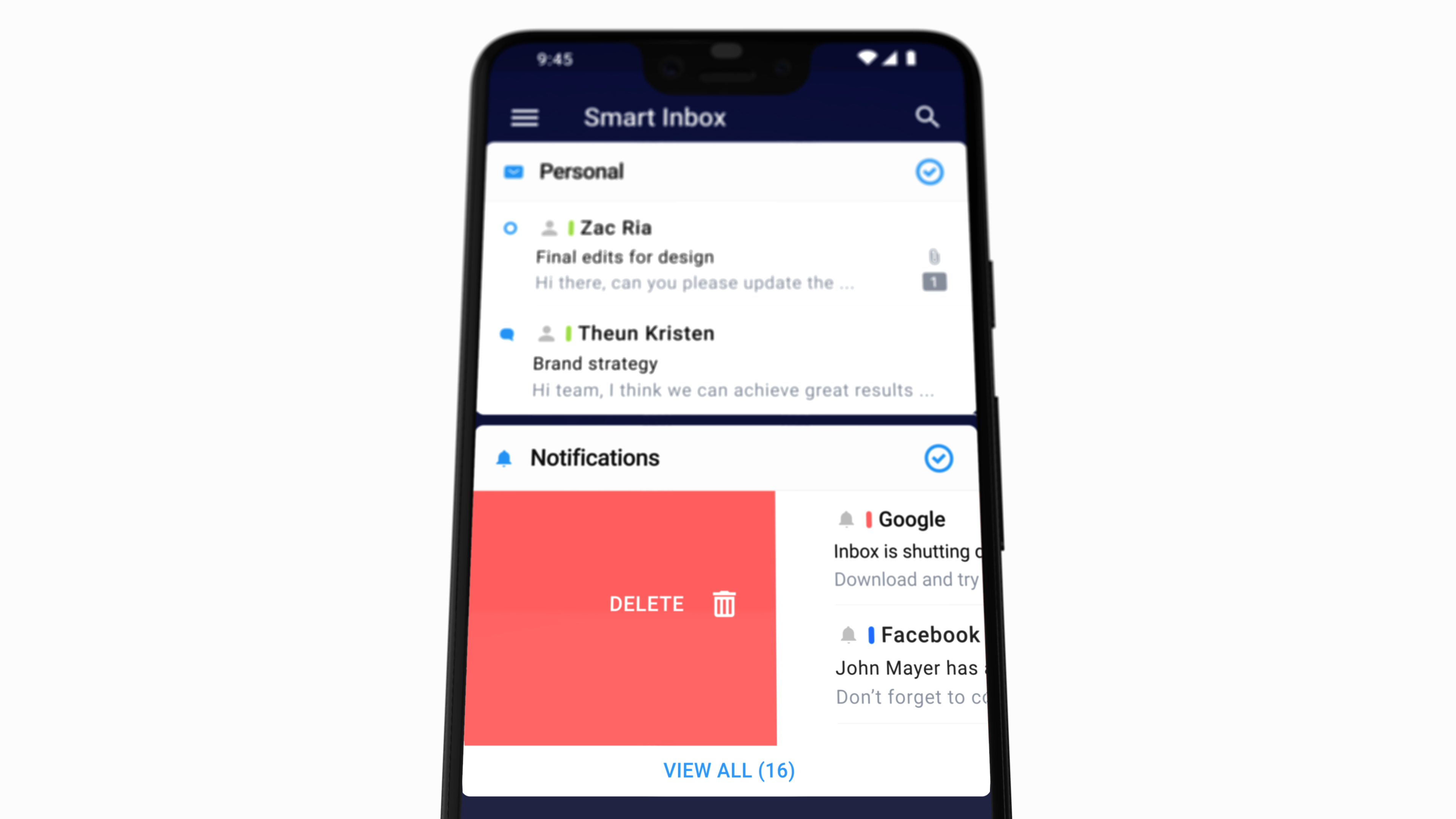
The timing of the release is perfect as Google Inbox is shutting down this week. If you’re into smart email clients that automatically sort your inbox based on multiple criteria, Spark could fit the bill.
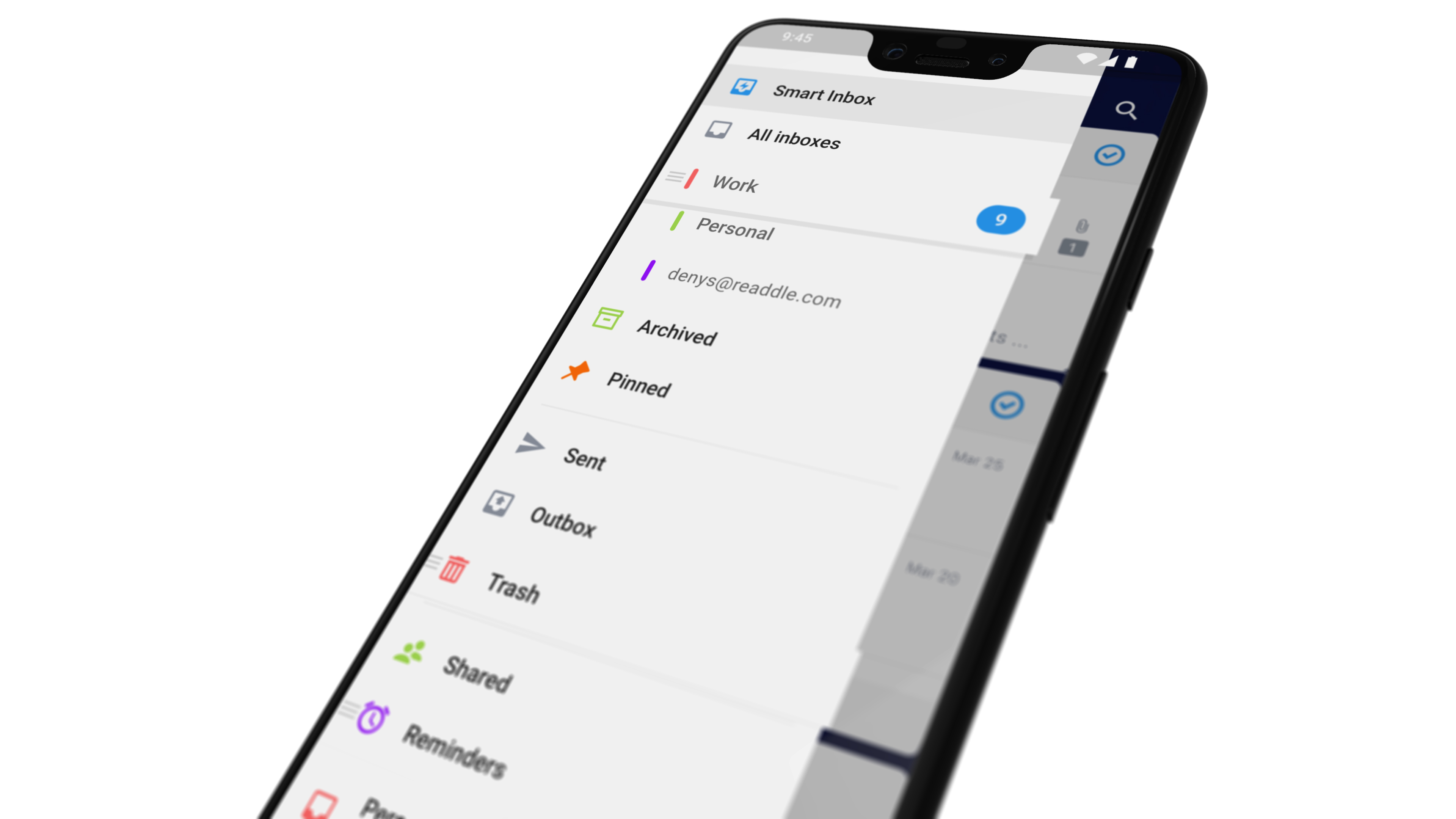
It starts with smart notifications. You can let Spark ignore non-relevant emails and notify you on important threads. Similarly, the Smart Inbox view puts newsletters and less important emails in separate categories so that you can focus on what’s important.
When it comes to dealing with individual threads, you can snooze them, schedule an email to send it at a later time and date, set up reminders and more. Many of those actions are now available in major email clients, so it’s important to know that you can find the same features in Spark.
Spark also lets you turn your inbox into a collaborative experience with your team, like Front. You can assign threads to other team members, comment on an email and @-mention your coworkers. You can also write a draft together pretty much like in Google Docs. Advanced features cost $6.39 per user per month.
Some features aren’t yet available on Android. The company is working on quick replies, email templates, email delegation for teams, the calendar view and third-party app integrations.
Mswipe, an Indian fintech company that develops point-of-sale terminals for merchants, has pulled $30 million in new funding as it bids to triple its reach to 1.5 million merchants over the next year.
The company’s previous funding as a Series D in 2017 that ended up at just over $40 million, thanks to a $10 million extension from B Capital — the investment firm set up by Facebook co-founder Eduardo Saverin that’s backed by BCG. This time around, B Capital has provided the funding alongside other returning investors that include Falcon Edge, Epiq Capital and DSG Growth Partners. The deal takes the startup to $95 million raised to date.
We wrote extensively about the company’s strategy back at the time of that 2017 round, and essentially the thesis is that POS devices remain essential despite the proliferation of new fintech like mobile wallets. With that in mind, Mswipe makes its terminals cheaper than the competition while it can also work on more limited internet connections, even 2G, to help merchants and retailers in more remote areas or those on a modest budget.
More critically, Mswipe CEO and founder Manish Patel believes the country is “ripe for disruption” because it has so few terminals. With less than three million terminals in operation across the whole of India, even Turkey, with a significantly smaller population of 80 million, has more.
Right now, Mswipe claims to have reached over 400,000 merchants — up from 290,000 at the end of 2017 — and Patel said today that the aim is to grow that figure to 1.5 million over the next year.
To reach that ambitious target, Mswipe is once again trying to put more than just a terminal inside a terminal.
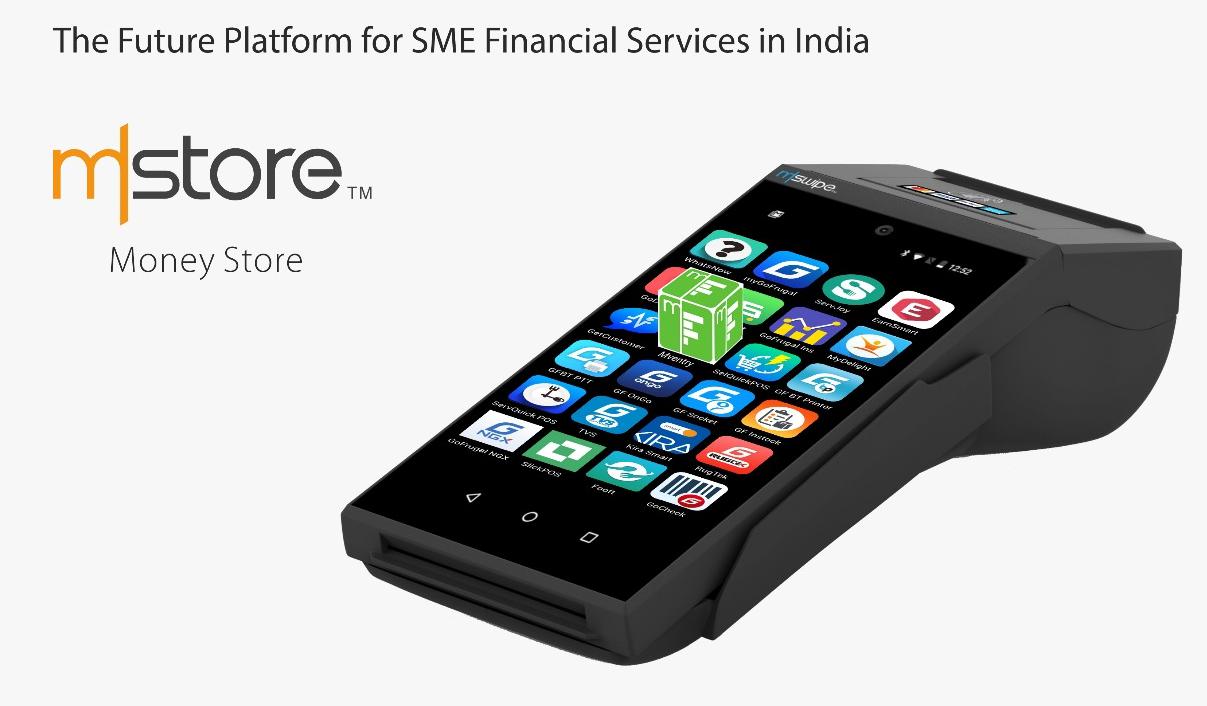
Beyond offering hardware that simply works and ties into newer types of payment, Mswipe has a vision of additional services for merchants. It is developing a new ‘smart’ POS — Wise POS Plus — that is developed on Android which allows applications like billing, inventory management and logistics to be pulled in, too. Indeed, the second piece to that is its own dedicated app store — MoneyStore — which is in development now and is aimed at housing a suite of productivity apps and related services for smaller retailers.
Mswipe is betting on a new Android-based smart terminal that will give its merchants access to productivity and management apps, too
“WisePOS Plus… powered by a suite of productivity apps, can enable a merchant to save thousands of rupees and hundreds of hours that go into running computer-based billing and inventory solutions with integrated payments. At the same time, we are also creating a huge opportunity for app developers with MoneyStore,” Patel said in a prepated statement.
The second major prong that he believes can bring this growth is the adoption of UPI, the government-backed real-time payments system in India. Mswipe said it is “all set to enable” the system which will allow QR payments at terminals. Mswipe is also working with lending startup Cashe on a co-branded card for consumers following a deal announced in December.
The latest iPhone and the newest version of Google’s Android come with tools to limit how much time you stare at your screen. Here’s how to make them useful instead of nags you’ll eventually turn off.
While some sat out on April Fools’, a number of big tech companies embraced the opportunity to waste time this way.
So without any further ado, here are the April Fools’ pranks from around the web:
The good
1) Google Tulip
Google Tulip, in my humble opinion, is Google’s best April Fools’ joke this year. It’s a product that lets you communicate with tulips (they’re making progress with cacti, which just want to be left alone, it would appear).
The premise itself is par for the course on April Fools’ day — the perfect mix of mildly plausible and “but why?” — but a few of the comedic touches on the video really make this prank shine.
If the bit at the :54 mark doesn’t tickle you, then I fully respect your opinion but we are very different people and I doubt we could ever be real friends.
2) Shutterstock stock IRL
This happens to be one of my favorite April Fools’ jokes from a tech company this year. Shutterstock is unveiling ‘plans’ to build the world’s largest physical library, called stock IRL, which would host “shelves upon shelves upon shelves” of stock photos, watermarked videos and music tracks.
Best line: “Because sometimes innovation means moving backwards.”
Sometimes, the idea itself can be an obvious prank as long as it’s executed well. It doesn’t hurt that Shutterstock does a pretty solid job marketing its actual product here, either.
This one is elegant and delightful. Spotify has transformed your Discover Weekly playlist to feature disco hits, or disco takes on non-disco hits. I’ve been listening to mine this morning and it’s solid. Oh, and the playlist is called Discocover Weekly.
Lovely.
4) Duolingo Push
The best way to learn a language is to practice every day. So Duolingo is introducing a more effective way to remind you with Duolingo Push.
“We’re taking push notifications out of your phone and into the real world! Duo the Owl will literally show up to remind you to practice. It’s the green-glove treatment you’ve always wanted.”
5) Google Maps Snake
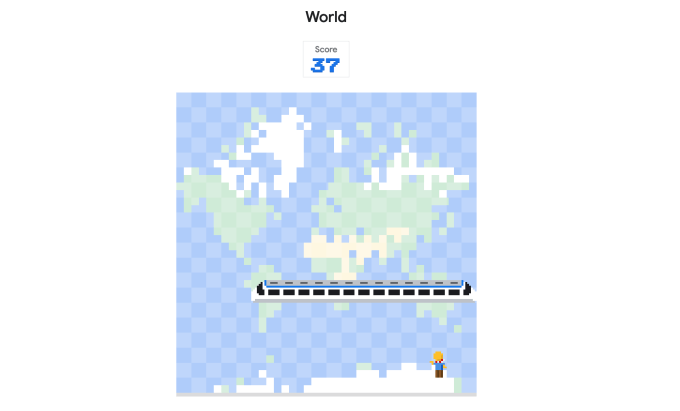
If this is a prank, it’s an incredibly generous and sweet prank that never hurt anyone. Google has put the classic Snakes game into the Google Maps app, for both iOS and Android, as well as on a standalone site for folks who don’t have the app.
It’s fun and simple and makes me wonder why this nostalgic little Easter Egg can’t live in the Google Maps app forever and for always.
(I died for that ^^ screenshot. You’re welcome.)
6) ProductHunt IPO
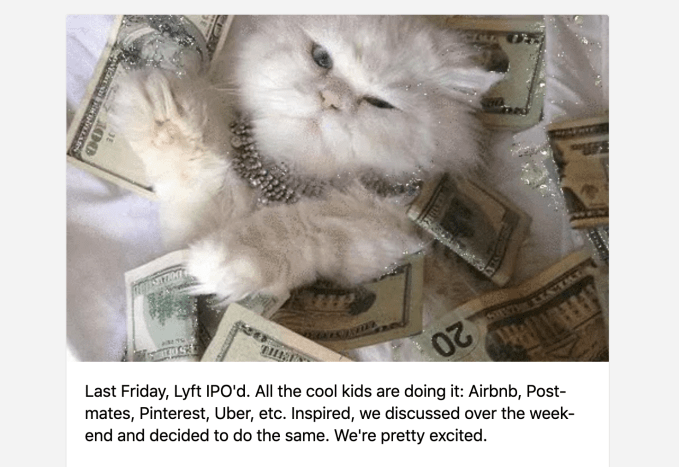
ProductHunt joked that it’s going public simply as a result of peer pressure. It also highlighted some of the April Fools’ pranks coming through on its own platform, including a SideDoor into college admission and a monstrous USB hub.
7) Waymo Pet
It’s exactly what you think it is. Waymo Pet is an autonomous car service exclusively for pets. The real beauty in this April Fools’ joke is in the details — the idea of Waymo employees overthinking the interior of a car based on the type of pet that may be riding in it is relatively humorous.
Best line: “Research shows us that cats love laser pointers.”
The not so good
1) Adobe Capture
Adobe wonders what would happen if designers could spark a memory through the smell of a particular ad or logo. Heralding the arrival of this hellscape is Adobe Capture, which uses Adobe Scent-sei technology to give users the ability to capture scents in the real world (through the camera?) and preview scents via the phone’s charging port.
Don’t shoot the messenger. It gets both better and worse from here.
2) General Cat-A-List
General Catalyst has spruced up their landing page with loads of cat gifs, powered by Giphy. Yes, General Catalyst is an investor in Giphy.
“We took this process seriously. To best convey that we sit at the cutting edge of all things new, bright and shiny, we spitballed our way through design-thinking sessions and administered Rorschach tests across the firm. We concluded that our brand should land at the intersection of tech + fun. What could illustrate tech-enabled fun better than the cat gif?”
3) Google Files Screen Cleaner:
Google is adding a new Screen Cleaner feature to the Files app. To clean it from the inside out. According to the video, the features uses “a smudge detector API” to identify imperfections, along with” geometric dirt models” and a “haptic micromovement generator” to sh-sh-shake it off.
And because they already committed, the team at Google decided to double down and say that the Screen Cleaner also uses micro vibrations to create a non-stick shield around your phone. Cause why not?
The Echo-like device (but also with a holographic display, for some reason) offers in-game coaching (insults), a rage converter (which translates your screamed profanities into words of encouragement for your inept teammates), and the Troll Destroyer (using internet-sourced facts to take down trolls on forums). Those are just a few of the features of the RON AI personal assistant, which feels a bit too bonkers to be funny.
“A” for effort, though.
5) 1Password
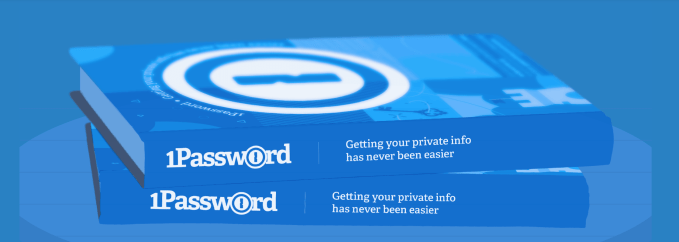
1Password just went for it today with the introduction of the 1Password Password Book, which is just a journal where you write down your passwords.
The landing page touts the book’s features, vacillating between pros and cons like “It’s Super Private” and “You can share your passwords.” Of course, analog password storage isn’t the worst way to store your passwords, especially if those passwords are strong in the first place and you’re keeping your Password Book in a safe place.
Alas, the Password Book is just a prank.
6) OnePlus Warp Car
The OnePlus #WarpCar is coming. Are you ready to say goodbye to gasoline? #NeverSettle
For years, rumors swirled that Apple might be working on a car. For April Fools’, the smartphone newcomer OnePlus teased an upcoming electric vehicle called the OnePlus Warp.
Shrug.
7) Razr Ping
Gaming hardware company Razr took some inspiration from Apex Legends, the hottest new game on the market. Razr Ping hypothetically lets people ping real-world objects with their smartphone, similar to the non-verbal comms system in Apex Legends.
Low-key, though, that comms system may very well be the exemplar for other games and even non-gaming platforms. Just not in the way Razr imagines here, obviously.
8) Roblox Console
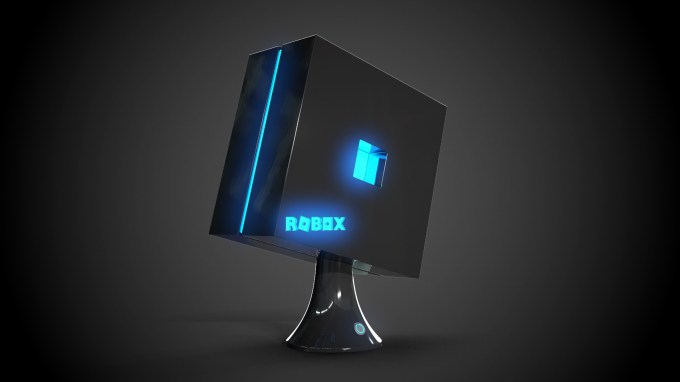
I’m not entirely sure what Roblox is doing here with the introduction of the first Roblox gaming console, offering “a new way to make your dreams a reality in stunning, 8K ultra-high definition graphics and at greater than 120 frames per second.”
“Deep underground in a secret laboratory, our engineers developed a groundbreaking processor that could distill imagination into a concentrated source of infinite energy,” reads the blog post. “That energy is what fuels the unbelievable technology in Robox.”
If it’s supposed to be funny, I don’t get it.
9) Roku PressPaws Remote
According to Roku, 72 percent of their users said they thought their dogs would enjoy TV more if they could control what’s on. Thus, the PressPaws Remote.
“This paws-specific remote could be a huge untapped market for us,” says Lloyd Klarke, director of product management for the Roku Pet Division. The remote has shortcut buttons shaped like paws, because the buttons are the only real barrier between a dog’s ability to master the TV remote.
10) SodastreamME
And then there’s such a thing as trying too hard. Sodastream presents the SodasteamME, which was built in partnership with astronaut Scott Kelly and allows folks to power their Sodastream with their own burps.
We may never know why.
11) Stack Overflow
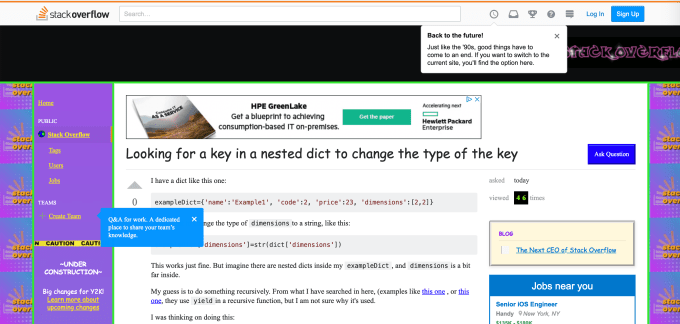
StackOverflow also went for a simple prank, taking the entire website back to the early days o the internet, complete with Comic Sans typeface. It’s jarring. You can check it out here.
It’s funny because it’s true? On March 29, Tinder teased a new Height Verification Badge (HVB), which would force users to verify their age by taking a photo of themselves standing next to any commercial building. Remember, this is three full days before April 1.
The blog post has at least one typo, and some questionable language. (Exhibit A: “Did it ever occur to you that honesty is what separates humans from sinister monsters? Of course not.”) There is also, however, some hint of truth. (Exhibit B: “Only 14.5% of the U.S. male population is actually 6’ and beyond. So, we’re expecting to see a huge decline in the 80% of males on Tinder who are claiming that they are well over 6 feet.”)
For a minute, we couldn’t decide if it was real or not. But Tinder has confirmed that this is an April Fools’ prank.
13) T-Mobile Phone BoothE
If you’re still here, we’re done. T-Mobile’s sacrificial lamb in this blood bath of a ‘holiday’ is the T-Mobile Phone BoothE, which is a soundproof phone booth.
Of note: T-Mobile CEO John Legere was an active participant in this prank, which raises concerns, but then again that’s sort of his style.
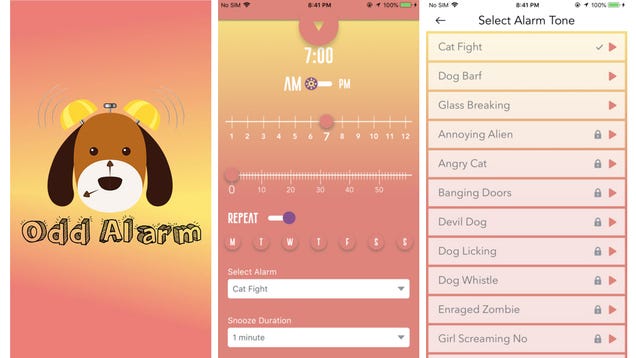
Neural adaptation is our brain’s ability to gradually ignore sounds, smells, and other stimuli we’re routinely exposed to. It’s what allows people who live in crowded urban settings to tune out all the noise at night and sleep, and then continue sleeping right through a familiar alarm clock sound in the morning. Odd…
Google’s ubiquitous email service has now been around for 15 years, so to celebrate this milestone, Gmail is getting a couple of important new features.
It seems as though with every passing year the smartphones in our pockets become more powerful and capable—and more prepared than they’ve ever been to be the only computing device we need in our lives. However, before you give away or sell that old laptop without replacing it consider these scenarios where you really…
Google’s Android, now 10 years old, has not been a stranger to security issues over the years. But with the mobile operating system now installed on over 2 billion devices globally, Google has been taking an increasingly firmer grip on trying to bring the problem under control. Now, the company has published its lengthy annual update to take stock on just how well that is going.
It’s a slippery slope to be sure, with the number of apps and the enterprising attempts to maliciously exploit them both growing. To wit, 0.04 percent of all downloads from Google Play were classified as potentially harmful applications (PHAs) by Google, versus 0.02 percent in 2017 — an increase in part because Google is growing the categories it’s identified and is tracking.
But Google said that new policies, such as more privacy-hardened APIs, along a wider implementation of Google Play Protect — its built-in malware scanner that comes with unforked versions of Android — have contributed to the company overall making a dent in the problem.
One area that Google singled out in the report this year was the impact that it’s having on protecting devices and users when they download and use apps from outside the Google Play store.
As this is a newer area that it’s tackling with more focus, there are more quantifiable wins to be had, and broadcasted. It didn’t provide a specific figure for how many PHAs it blocked from the Google Play store in 2018 (note that in 2017 it did disclose this: it was 700,000). But in 2018 it noted that “Google Play Protect prevented 1.6 billion PHA installation attempts from outside of Google Play.”
Notably, when it comes to apps on the Google Play store, on devices running unforked versions of Android, the dent seems to be mostly keeping the problem of potentially harmful applications at bay, while the impact on apps that are sideloaded not through Google Play has been more pronounced.
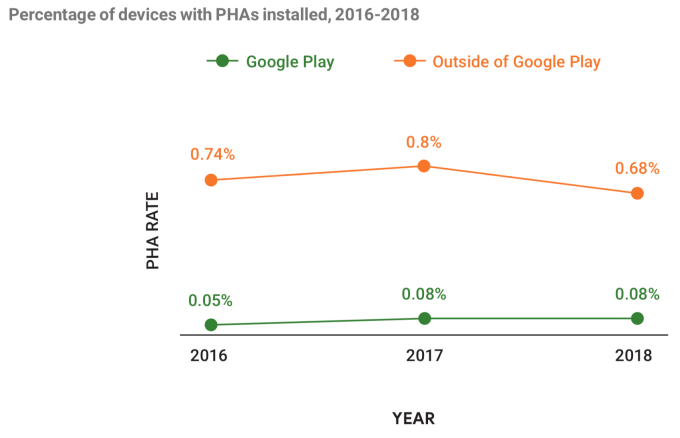
Google noted that in 2018, some 0.08 percent of devices that used Google Play exclusively for app downloads were affected by PHAs. That figure, however, is actually the same as the year before, and actually a bit higher than the year before that.
In contrast, the impact on those downloaded outside of Google Play has been more dramatic — albeit the problem is clearly a bigger one. The number detected in 2018 stood at 0.68 percent, down 15 percent from 0.8 percent a year ago (which itself also had gone up from 2016).
The chances of installing malicious apps, meanwhile, are improved if you have Google Play Protect working. Some 0.45 percent of Android devices using it, installed PHAs, down from 0.56 percent in 2017.
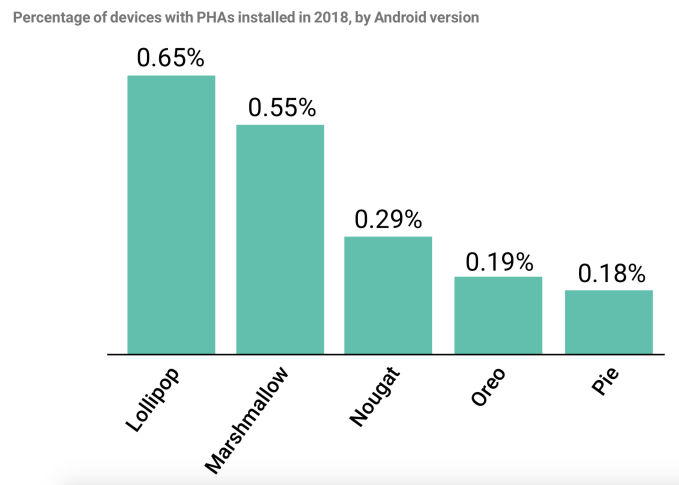
It seems also that this trend is partly down to general improvements over time across the whole Android ecosystem, with later versions of the OS showing better rates of PHA installs. Notably, however, the reduct between Oreo and Pie was only a 0.01 percentage point. It’s getting more challenging to address the problem after more drastic reductions in earlier years.
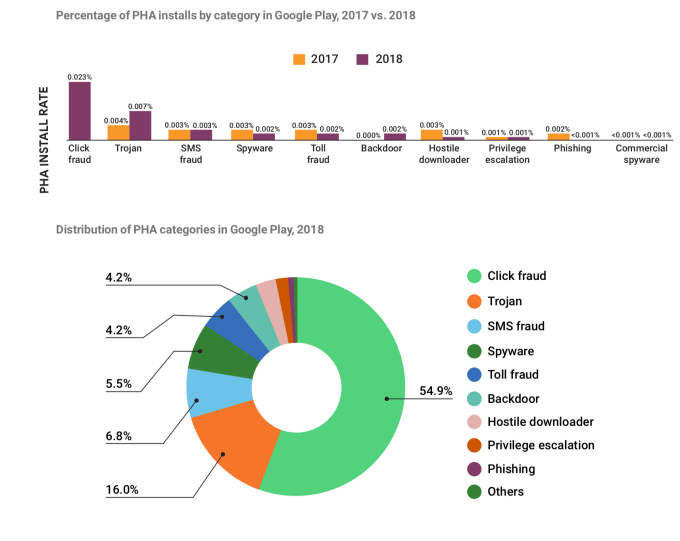
In terms of the categories that are covered by PHAs at the moment, click fraud is by far the highest category both in terms of install rates and distribution. Notably, 2018 was the first year that Google started tracking click fraud as a potentially harmful application: in the past it had been classified as a policy violation. This is one example of how it’s looking to cover more surfaces for potential vulnerabilities, but also a surprise to see that it wasn’t part of the mix before, considering how huge it is. Partly as a result of it now detecting and blocking click-fraud post recategroization, Google noted that it “expect[s] click fraud to remain a profitable fraud vector, but at a lower scale than in 2018.”
Google noted that the two biggest click fraud families were FlashingPuma and CardinalFall, and that the main target countries for click fraud attempts were the USA, Brazil and Mexico (USA and Brazil being two of Google’s biggest markets for Android).
While there are straight click fraud apps, Google notes that most are designed around other services, often something that a consumer might use daily — most commonly flashlights, music and gaming apps. In these, “an embedded SDK is executing click fraud in the background, often without the knowledge of the app developers themselves. Distributing click fraud code in this way is easily scalable and makes it easy for click fraud SDK developers to be present in the apps of hundreds or even thousands of developers,” Google notes in its report.
But even as Google gets more sophisticated and strict in how it handles third party players in its ecosystem, the problem continues to morph and find new areas to exploit.
Just last week, a report was published that highlighted how pre-installed apps — the non-Google apps that come on your device either fully installed or as a link to an install — were providing links into vast ecosystems of services that pull user data, and were difficult to remove for anyone but the most technically advanced.
Weeks before that, yet another tranche of 200 apps were identified that slipped in under the radar littered with adware (on top of another 85 apps also loaded with adware that millions of people downloaded months before). Adware isn’t the only ‘ware that has been found in Google apps: in November last year it was revealed that half a million people downloaded apps from Google Play containing malware, too.
And it was only two months ago that Google finally started to crack down and pull apps that were using legacy permissions to access users’ call logs and SMS messages. (Those permissions have been replaced by more privacy-focused APIs, but the fact is that that those permissions used to exist, and Google hadn’t stopped letting apps use them until quite recently.)
While much has been made of the open source nature of Android being one of the reasons that it’s misused in this way, another is the fact that a lot of apps are developed with open source components, and these can be ripe for exploitation. One recent report, in fact, found that no less that one in every five Android apps has vulnerabilities in it as a result of that open source usage.
While it’s misleading to think that Apple and iOS are not prey to similar kinds of exploits — they are — the fact that the Android ecosystem is simply so much bigger, and more open than the tightly controlled iOS platform, makes it an especially interesting target for malicious actors.
All these might not all be malicious in the sense of, for example, hacking financial information or disabling your device, but privacy of information and information security nonetheless go hand-in-hand. Having a grip on one leads to better control of the other.
Exactly fifteen years ago, Google decided to confuse everybody by launching its long-awaited web-based email client on April 1. This definitely wasn’t a joke, though, and Gmail went on to become one of Google’s most successful products. Today, to celebrate its fifteenth birthday (and maybe make you forget about today’s final demise of Inbox and tomorrow’s shutdown of Google+), the Gmail team announced a couple of a new and useful Gmail features, including improvements to Smart Compose and the ability to schedule emails to be sent in the future.
Smart Compose, which tries to autocomplete your emails as you type them, will now be able to adapt to the way you write the greetings in your emails. If you prefer ‘Hey’ over ‘Hi,’ then Smart Compose will learn that. If you often fret over which subject to use for your emails, then there’s some relief here for you, too, because Smart Compose can now suggest a subject line based on the content of your email.
With this update, Smart Compose is now also available on all Android devices. Google says that it was previously only available on Pixel 3 devices, though I’ve been using it on my Pixel 2 for a while already, too. Support for iOS is coming soon.
In addition to this, Smart Compose is also coming to four new languages: Spanish, French, Italian and Portuguese.
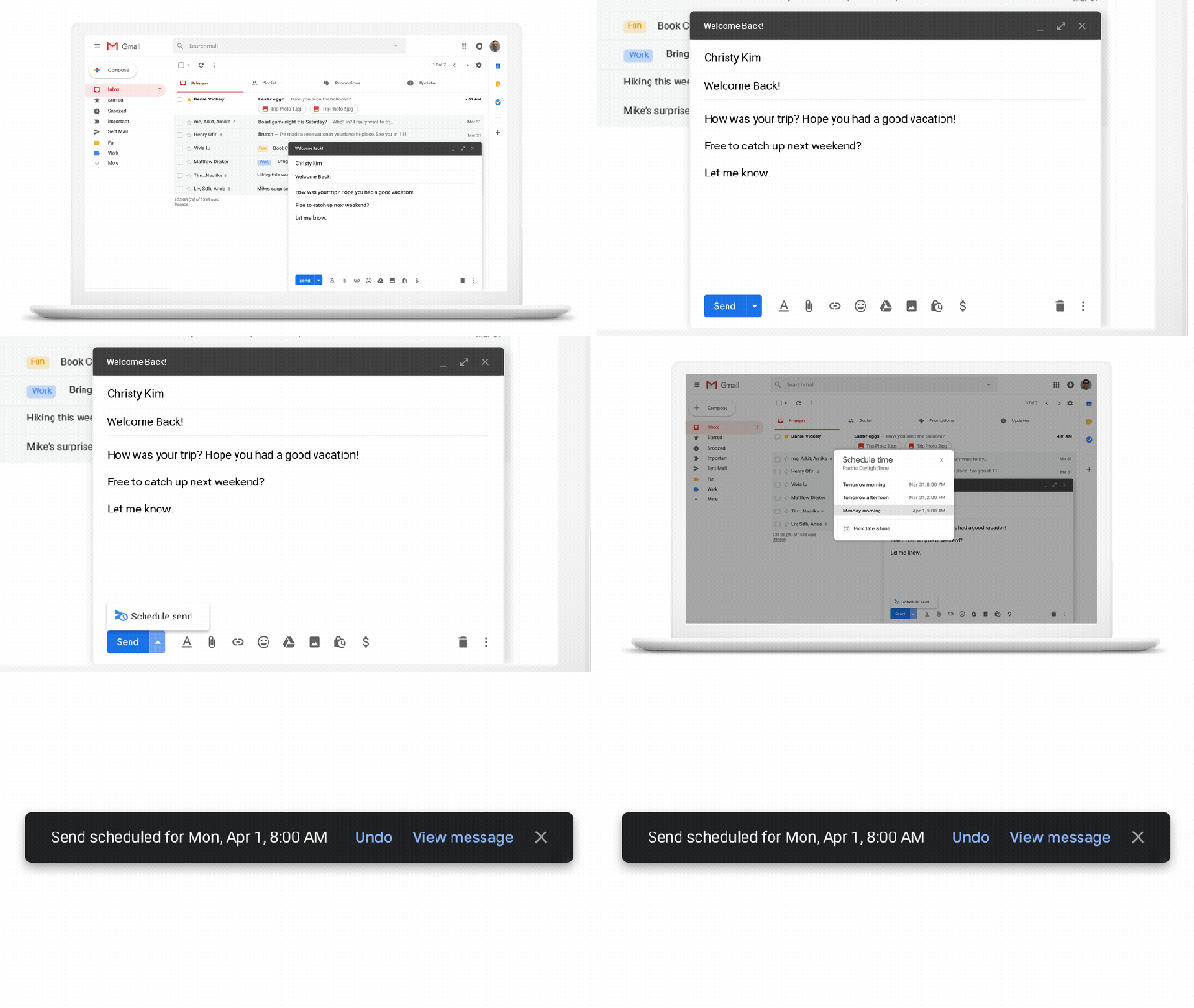
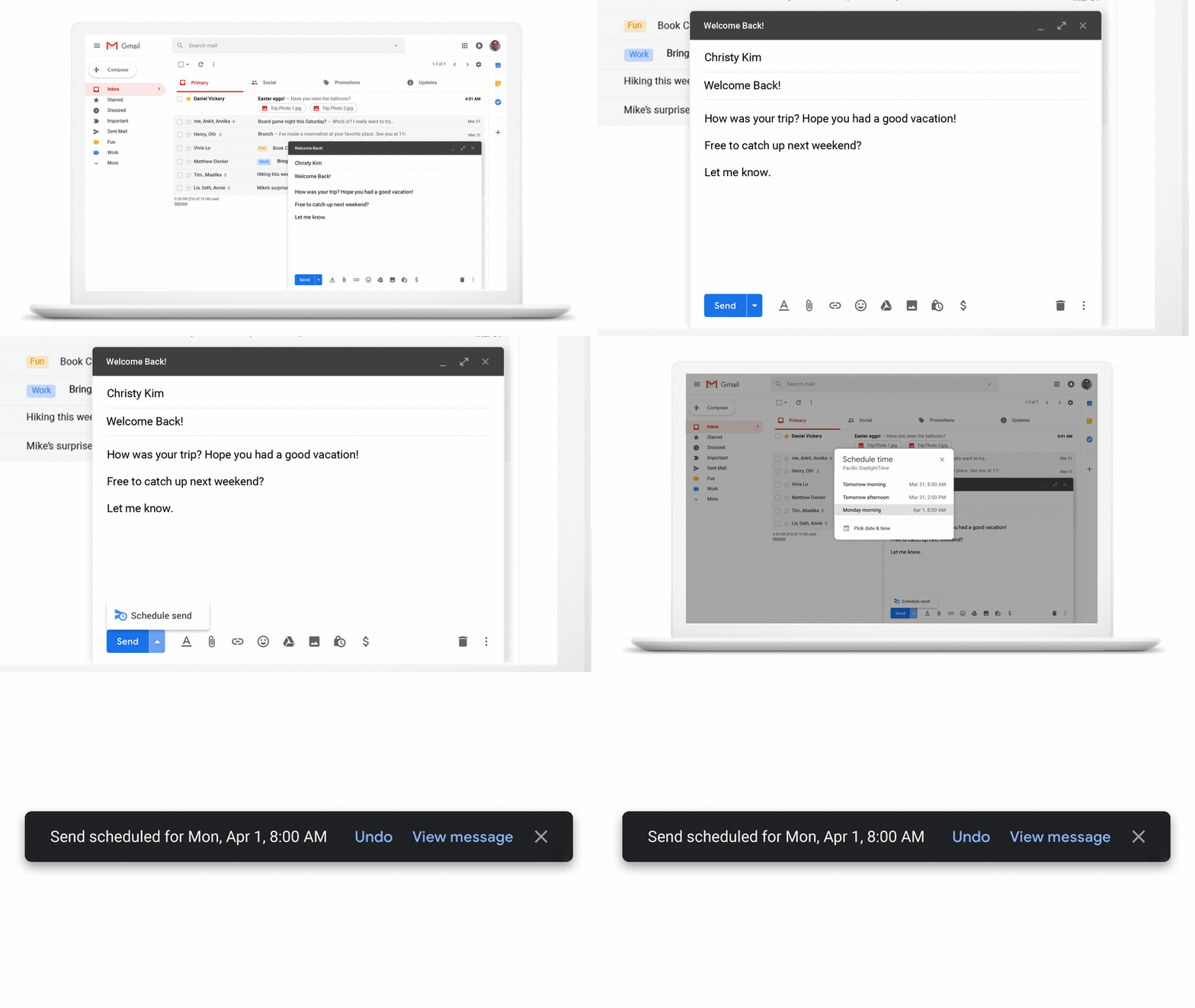
That’s all very useful, but the feature that will likely get the most attention today is email scheduling. The idea here is as simple as the execution. The ‘send’ button now includes a drop-down menu that lets you schedule an email to be sent at a later time. Until now, you needed third-party services to do this, but now it’s directly integrated into Gmail.
Google is positioning the new feature as a digital wellness tool. “We understand that work can often carry over to non-business hours, but it’s important to be considerate of everyone’s downtime,” Jacob Bank, Director of Product Management, G Suite, writes in today’s announcement. “We want to make it easier to respect everyone’s digital well-being, so we’re adding a new feature to Gmail that allows you to choose when an email should be sent.”




 (@mims)