Saturday, July 28, 2018

Verizon’s new Safe Wi-Fi is a VPN that blocks ad tracking for $3.99 a month

Verizon has rolled out a new product called Safe Wi-Fi, a VPN that provides a security stop gap for its mobile customers logging onto a public network. It’s also being marketed as a way to block ads.

So WTF is a VPN and why does it matter? A VPN is a virtual private network. It sits between a device in front of you and a server in a data center. Think of it as a tunnel that cloaks or hides your internet traffic from other folks on your local network. That open Wi-Fi at your local coffee shop can give advertisers and more nefarious types the ability to track your IP address. A VPN provides a secure connection between you and the server, and hides the IP address from prying eyes.

Safe Wi-Fi (check out the video below) costs $3.99 a month per account and is available to Verizon customers on Android and iOS. Safe Wi-Fi covers up to 10 devices on a single account.

Verizon customers can sign into My Verizon and go to the Products & Apps page, scroll to Safe Wi-Fi and then click “get it now” to subscribe. The Safe Wi-Fi feature is then added to their account. Customers can download the Safe Wi-Fi app from the Google Play Store or Apple App Store on their device and then follow the onscreen instruction to sign up with a one-month free promotion.

Users can turn on the “Ad Tracker Blocker” within the Safe Wi-Fi settings. The Ad Tracker Blocker prevents customers from ad network tracking while browsing the internet, and from ads generated from the device’s downloaded apps, according to Verizon’s FAQ page on the feature. In some cases, ads will be blocked entirely to prevent ad trackers from working. A gray image will replace the ad on the screen, Verizon says.

Websites that require ad trackers may be blocked, according to the company.

Verizon owns Techcrunch parent company Oath.


Source: TechCrunch http://j.mp/2ve2C30

How I made my own WireGuard VPN server

Some of you may have heard about VPN protocols that let you establish a connection between your device and a server, such as OpenVPN and IPsec. But there’s a brand new shiny protocol that promises to be faster and more secure at the same time — WireGuard.

But WTF is a VPN anyway? A VPN is a virtual private network between a device in front of you and a server in a data center. If you want to hide your internet traffic from other people on your local network, you can create a tunnel between your device and a server.

All your network traffic will go through this connection, and traffic is usually encrypted from one end to the other. It means that your overzealous IT department or the Great Firewall of China can’t block any service.

And yet, it also means that the person who operates the server can see all unencrypted traffic. That’s why I never recommend using a free VPN service or even paying for an account. Using a VPN doesn’t mean that you’ll be more secure on the internet. You’re just moving the risk down the VPN tunnel.

Many VPN companies analyze your browsing habits, sell them to advertisers, inject their own ads on non-secure pages, steal your identity, log your internet traffic, share information with law enforcement and more.

When it comes to VPN companies, trust no one.

Looking at the protocols

There are multiple ways to create a point-to-point VPN tunnel. Your device and the server need to use the same protocol to talk to one another. The most popular protocol is OpenVPN. It’s a secure implementation that works on pretty much any device, as long as you’re willing to install an app.

IPsec, combined with IKEv2 authentication, is another popular protocol. It works natively on iOS, macOS, Windows and Linux. That’s why it’s a great option for devices where you can’t install any app you want.

You may have also heard about PPTP or L2TP as well. But those protocols aren’t as secure and nobody should use them anymore.

It seems like there are plenty of options already. But OpenVPN has been around for 17 years. It is slow and it was never designed for mobile devices.

OpenVPN and IPsec also have a huge codebase, which creates a bigger attack surface. It’s unclear whether the NSA has found vulnerabilities in those protocols because it’s harder to audit big codebases. WireGuard creator Jason Donenfeld only wrote 4,000 lines of code for the initial release.

Connecting to a WireGuard server is pretty much like connecting to a remote server using SSH. You generate a set of public and private keys and exchange public keys with the server. It’s both secure and hard to fool.

Compared to other VPN protocols, WireGuard relies on your device’s network interfaces. It adds a new interface to natively route all traffic through the tunnel, whether you’re using Wi-Fi, Ethernet, LTE, etc.

Regular VPN users also know that you have to reconnect to the VPN server every time you switch from Wi-Fi to LTE to Ethernet… WireGuard servers can maintain the connection with your device, even if you switch to another network and get a new IP address.

WireGuard is still quite new and experimental. For instance, you won’t find any WireGuard client for iOS. There are also very few WireGuard implementations with a graphical user interface.

Building your own VPN server

If you want to give WireGuard a try, it’s not that hard. You may remember that I talked about Algo VPN in the past. It’s a great open source project that lets you set up your own VPN server in just a few minutes. You don’t need any coding skill.

It turns out Algo VPN now supports WireGuard in addition to IKEv2. In other words, creating a VPN server with Algo VPN will let you connect to this server using both protocols.

Algo VPN runs on any Ubuntu server, but the easiest way to host your server is to create an account on DigitalOcean. After that, you’ll need to download a zip file and follow the instructions.

Once the setup is done, you should have a new folder on your hard drive with everything you need to connect to your VPN server. If you’re on a Mac, you can double-click on the .mobileconfig file to connect to your VPN server from your Mac using IKEv2.

If you want to try WireGuard, you’ll need a computer that runs macOS or Linux, or an Android phone. The easiest way to use WireGuard is to install the Android app and add the .conf file to your phone.

On your Mac, you need to install WireGuard using Homebrew (brew install wireguard-tools). You can then move the myvpnserver.conf file to /etc/wireguard/ on your hard drive and connect using a simple command line (“wg-quick up myvpnserver” and “wg-quick down myvpnserver”).
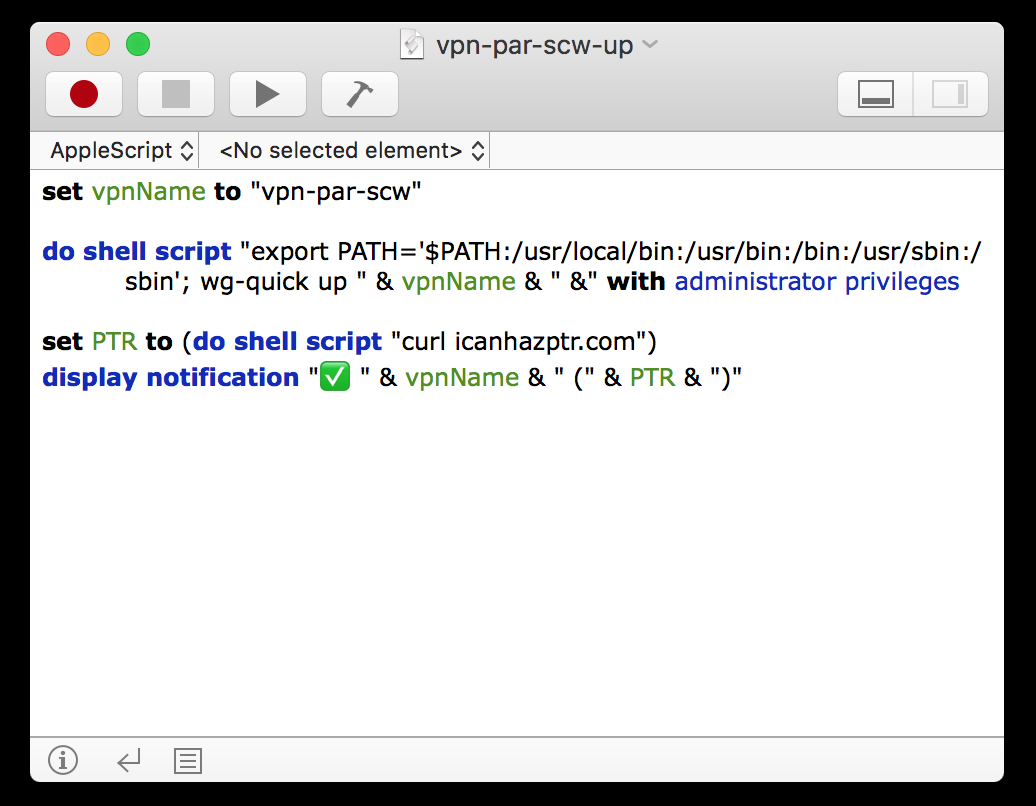
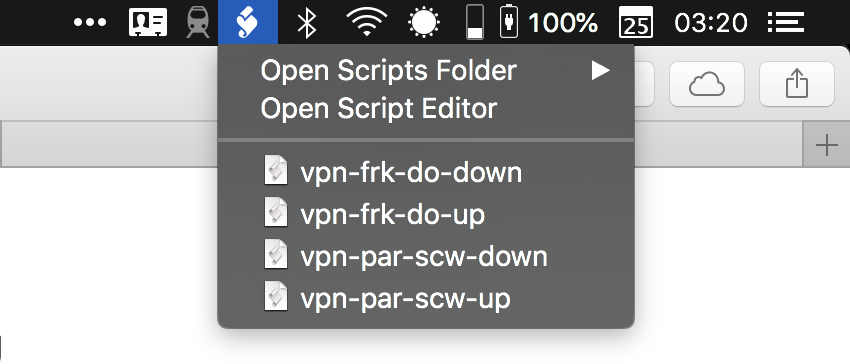
I wanted to go one step further and skip the Terminal window. On macOS, you can create an AppleScript using the Script Editor app and put it in your menu bar by enabling the menu bar option in the settings.
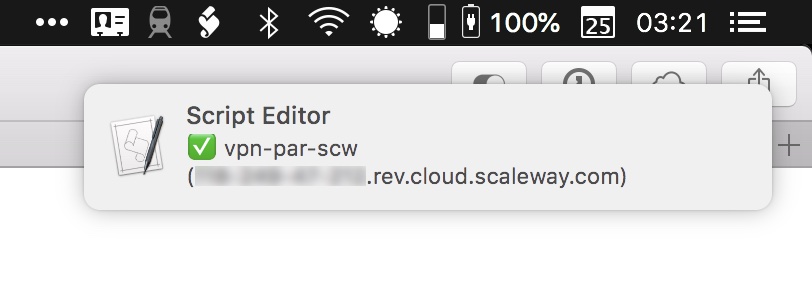
In my script, I also fetch my current hostname using icanhazptr.com. I then display my current hostname in a notification to check that I’m connected to the VPN server. In this case, I created a VPN server on Scaleway:
There you have it. Now you can’t say that you prefer to use a commercial VPN service because they have a nice menu bar app. This setup offers the same convenience but with a more stable VPN connection.

Once again, WireGuard is experimental. You need to assess your risks before using WireGuard at a production level. If you’re Edward Snowden, WireGuard might not be ready for you just yet. You also need to be comfortable with a buggy implementation. For instance, I had a DNS issue after shutting down a WireGuard connection, so I had to reset the DNS settings in my network interfaces.

But the fact that you can close your laptop, switch to another Wi-Fi network and stay connected to the VPN server is pretty neat. It’s clear that WireGuard represents the future of VPN protocols.


Source: TechCrunch http://j.mp/2OpE1Rn

Friday, July 27, 2018

Amazon may soon let you collaborate with others on Wish Lists

Amazon may soon be adding a feature consumers have wanted for years: collaborative wish lists. A number of people using Amazon.com and its mobile app recently spotted the option to “invite others” to their wish lists. This offers a URL that can be shared via text messages, email, social apps and more. Once clicked, the invitees can then both add and remove wish list items, alongside the wish list’s original owner.

The feature, while relatively minor, is something Amazon shoppers have been clamoring for. Parents want to be able to co-manage wish lists for their kids, while others – like friends, couples, party planners, family and friends – have also wanted to team up on lists of gift ideas for special occasions, such as birthdays, holidays, and various celebrations.

But there’s been some confusion over whether or not the feature was something Amazon was only testing, or if it was in the early stages of a rollout to all users.

Amazon declined to comment on its plans specifically, but did tell us this is a test with a “small number of customers.”

As one report from MacRumors noted, there are some Wish List features not everyone has, even if they’ve been opted in to the new collaborative lists test. For instance, some people will also see a conversation icon on the right side of the list’s page that allows list members to discuss items on the list with one another. Another ellipsis icon lets the original list creator manage the list’s membership.

So far, the feature has been spotted on the Amazon.com desktop and mobile website, and on iOS but not Android. It’s common for Amazon to launch new features on iOS first, however. That’s the case with the recent debut of Part Finder, which has launched publicly, but only on iOS to start.

Image credit: MacRumors


Source: TechCrunch http://j.mp/2NRlWKT

Browser maker Opera successfully begins trading on NASDAQ

Opera is now a public company. The Norway-based company priced its initial public offering at $12 a share — the company initially expected to price its share in the $10 to $12 price range. Trading opened at $14.34 per share, up 19.5 percent. The company raised over $115 million with this IPO.

Opera Ltd. filed for an initial public offering in the U.S. earlier this month. The company is now trading on NASDAQ under the ticker symbol OPRA.

Chances are you are reading this article on Google Chrome or on Safari if you’re reading from an iPhone. Opera has a tiny market share compared to its competitors. But it’s such a huge market that it’s enough to generate revenue.

In its F-1 document, the company revealed that it generated $128.9 million in operating revenue in 2017, which resulted in $6.1 million in net profit.

The history of the company behind Opera is a bit complicated. A few years ago, Opera shareholders decided to sell the browser operations to a consortium of Chinese companies. The adtech operations now form a separate company called Otello.

Opera has a handful of products — a desktop browser, different mobile browsers and a standalone Opera News app. Overall, around 182 million people use at least one Opera product every month.

The main challenge for Opera is that most of its revenue comes from two deals with search engines — Google and Yandex. Those two companies pay a fee to be the default search engine in Opera products. Yandex is the default option in Russia, while Google is enabled by default for the rest of the world.

The company also makes money from ads and licensing deals. When you first install Opera, the browser is pre-populated with websites by default, such as eBay and Booking.com. Those companies pay Opera to be there.


Source: TechCrunch http://j.mp/2K0ZgFQ

LinkedIn adds voice messaging because we’ve definitely been clamoring for that

In a truly bizarre move, LinkedIn is adding voice messages to the professional networking platform.

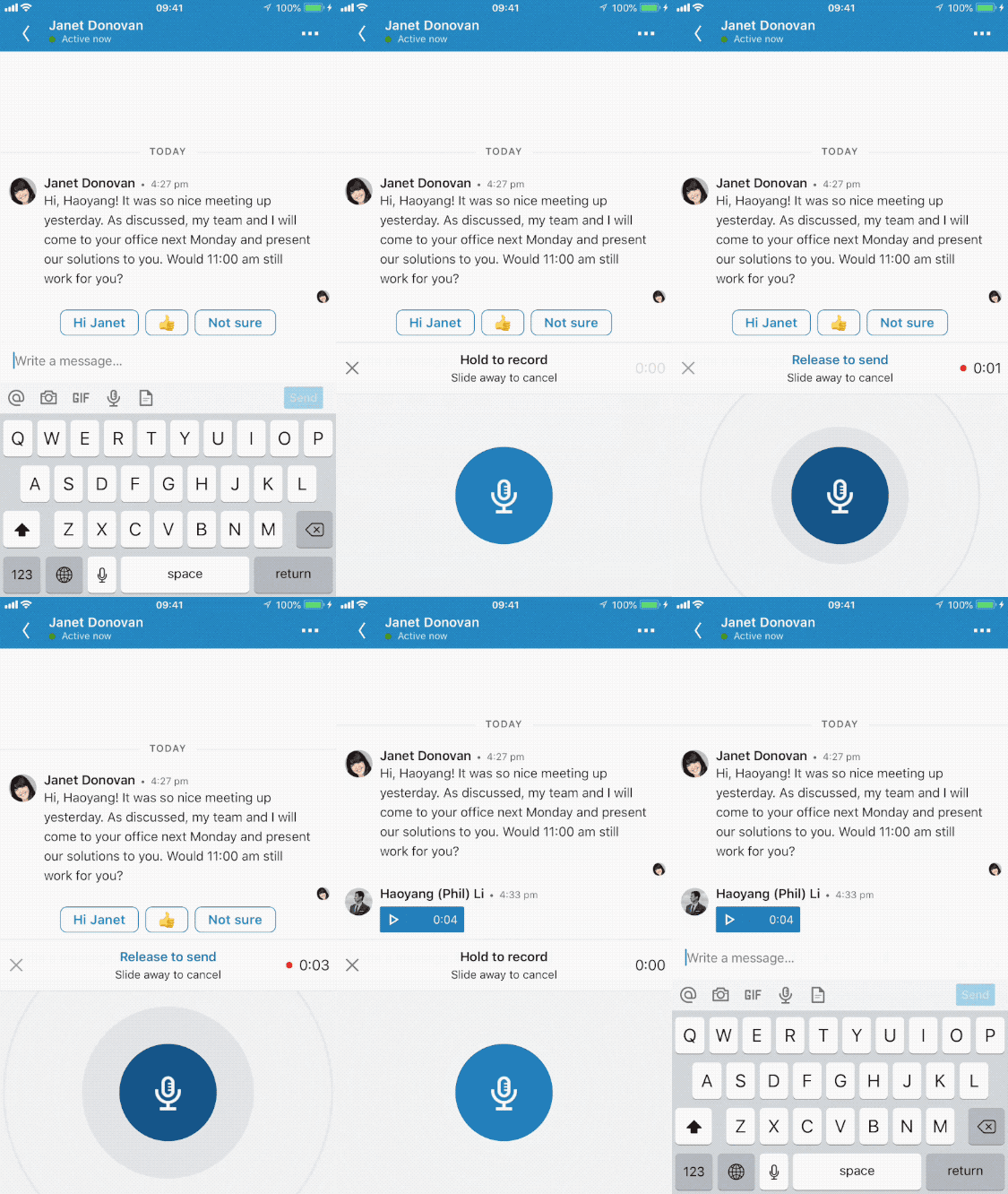
The voice recording feature, which will roll out to all users over the coming weeks, is available via the iOS or Android app. Users can receive messages on both mobile and on the LinkedIn website. The voice messages can be up to one minute long.

While LinkedIn has proven itself a powerful tool for professional networking, with particular popularity among recruiters and HR professionals, it can also feel a bit like a second overwhelming email inbox. Voice messages could prove to be a nice break from the text, but could also add a new weight to all the inbound messages users receive on the platform.

So why did LinkedIn add voice messaging?

According to the blog post, the reasons are three-fold.

The first reason is for convenience — LinkedIn thinks that sending voice messages on the go is easier than typing them out. The second reason is that the asynchronous nature of LinkedIn, as compared to phone calls and voicemails, is easier for recipients of voice messages. And finally, the company believes that users can better express themselves via voice.

While all that may be true, I’m not sure voice messages fit with the overall purpose of LinkedIn. LinkedIn is predominantly used for connecting with people that you don’t already know, in a professional setting. It’s relatively rare to call up someone you don’t know at all to discuss potential employment or recruiting, whereas sending that person an email is perfectly acceptable.

Using the feature seems pretty easy. Simply tap and hold the microphone icon to record your message, and release the icon to send. To cancel, slide your finger off the microphone icon before you release.

LinkedIn, which was purchased by Microsoft in 2016, now has 562 million users.


Source: TechCrunch http://j.mp/2mMlemI

Google follows in Apple’s footsteps by cleaning up its Play Store

Google is cracking down on the apps published to the Play Store. An updated version of the company’s Developer Policy, released this week, indicates the company will now ban a wider variety of apps including cryptocurrency miners, those selling firearms and accessories, those that aim to trick children into downloading adult-themed apps, and apps built using automated tools or wizard services, or based on templates.

The latter move is especially interesting, as Apple did something similar last December that resulted in developer backlash, controversy, and even a U.S. Congressman reaching out to Apple to clarify its intent and reconsider its policy.

While it’s true that apps made with templates and wizards lead to spam apps and App Store clutter, several developers felt Apple, with its blanket ban, was wiping out small businesses from being able to participate in the App Store. The issue at hand was the fact that many smaller businesses, nonprofits and other organizations used an app templating service to create their own app. For example, templates and wizards were often used by local restaurants, schools, churches, clubs, and other small businesses that couldn’t invest in the design and development of their own apps.

As a result of the backlash, Apple revised its policy so it only impacted developers attempting to spam the App Store with multiple copies of a certain type of app. Instead of banning all templated apps, Apple’s new policy said that apps built using templates would be allowed if they were submitted by the provider of the app’s content. That is, if the local pizza place wanted its own app, it could submit its templated-built app itself.

Google clearly made a point not to make the same mistake with its own policy changes.

Its new policy clarifies the ban effects only:

Apps that are created by an automated tool, wizard service, or based on templates and submitted to Google Play by the operator of that service on behalf of other persons are not allowed. Such apps are only permissible if they are published by an individually registered developer account belonging to the user of the automated tool, not the operator of the service.

This more careful wording ensures that the policy will only address the problems with app store spam, and not with small business customers, or the app development services they use.

Another Google Play policy change bans apps that mine cryptocurrency on devices – something that could make it easier for Google Play to directly kick out apps that market themselves as something else, then mine on the sly without user’s consent. This follows a Google’s ban of mining apps from the Chrome Store this spring, due to a number of sketchy extensions that were misleading users.

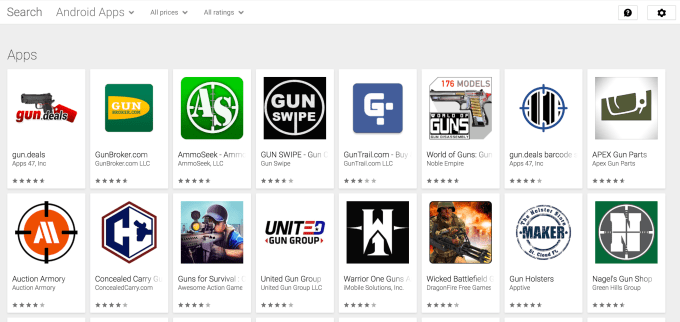
Meanwhile, Google takes an almost moral position with the addition of a ban of apps that ” facilitate the sale of explosives, firearms, ammunition, or certain firearms accessories.” Specifically, Google calls out apps that sell accessories used to simulate automatic fire or convert firearms to automatic fire. This includes bump stocks, gatling triggers, drop-in auto sears, conversion kits, and magazines or belts carrying more than 30 rounds.

The change here follows the approval of several newer state laws banning bump stocks across the U.S., in the wake of an increasing number of school shootings. Gun control advocates believe that the loss of life in mass shootings could be lessened if the perpetrators didn’t have ready access to guns and accessories that allow for automatic fire.

It doesn’t seem Google has taken action on this category, however:

Other policy changes take aim at various types of misleading apps, including those adult-themed apps that appeal to children (something Google’s YouTube struggles to moderate as well, in terms of misleading video); apps that only seem to exist to serve ads (ads appear after every tap, e.g.); and apps engaging in impersonation.

Many of Google’s policy changes address areas of app spam and clutter Apple had already tackled, having announced a year ago its plans to clean up the App Store. Its cleanup was so sizable, in fact, that the App Store shrank for the first time ever in 2017. It’s now around 2+ million apps.

At this year’s WWDC, Apple again updated its guidelines to further secure the App Store, which included its own version of a crypto mining ban.

Google’s Play Store has been in need of a similar cleanup. Although Google regularly kicks out sizable numbers of malicious apps, it has always been more lenient on spammy apps than Apple. That’s allowed the store to grow to 3.5 million apps, as of December 2017. Many of those apps should now be removed, if Google chooses to retroactively enforce its new policies at scale – which remains to be seen.

(h/t to Android Police, which first saw the policy changes) 


Source: TechCrunch http://j.mp/2mLZI1v

Tech Tip: When You Want to Be Disturbed During ‘Do Not Disturb’ Time

Android and iOS have a setting to mute alerts, calls and notifications when you need some peace and quiet, but you can still let important calls ring through.

Source: NYT > Technology http://j.mp/2va4Osd

Thursday, July 26, 2018

A Guide to Using Android Without Selling Your Soul to Google

As soon as you start up a new Android phone, you get prompted to sign in with your Google account—but what if you don’t want to do that? Maybe you want to take advantage of Android but limit what Google knows about you, or maybe you just prefer the alternative apps; whatever the case, here’s how to live a Google-free…

Read more...


Source: Gizmodo http://j.mp/2NOk2uN

Review: Lenovo’s Google Smart Display is pretty and intelligent

Smart speakers have come a long way over the past few years as Amazon, Google and Apple have delivered pretty noteworthy strides in the IQs of their assistants. Where speakers haven’t advanced as much is in how they offer users choices; Google Assistant can only list out so many options before you get sick of listening, so throwing a screen onto these devices was a pretty inevitable evolution.

At CES earlier this year, Google showcased what it called Smart Displays. Today, Lenovo’s device goes on sale. The device, to be clear, pretty much just looks like an Android tablet that you plug with Google Assistant on it. What’s interesting is how the device handles visual feedback for audio commands, giving lightweight visual context for some queries and more robust video/photo content for others. Google clearly doesn’t have all of the core tenets of its Smart Display interface philosophy hammered out, and yet for the most part this is a very pleasant product that strikes all of the right notes on design.

[gallery ids="1680847,1680844,1680843,1680845"]

The device comes in two flavors, a $249 10-inch 1080p version and a $199 8-inch 720p version. There aren’t any difference beyond the screen size so it really depends on where you’re keeping it. I’d imagine that people who are putting something like this on their nightstand as a way-too-smart alarm clock might want the smaller version whereas if you have a bit more room in your kitchen or living room the 10-inch version might offer some needed screen real estate. For this review I tested out the 10-inch $249 variant.

While I didn’t have too many qualms with the hardware, it was much easier to pick out things that bothered me about the way Google has approached the Smart Display software. While some tasks were refreshingly thought out, like searching for and progressing through recipe instructions, others, like finding a specific YouTube video were frustratingly difficult.

The Smart Display is fundamentally a Google Home device that can also communicate to you through visuals. It may look like a tablet with a speaker, but you will not find anything resembling a full app on the device, you will not be entering in text via an onscreen keyboard and you will certainly never see a “menu” button. This is a tablet with an identity crisis, a product that can use certain functionality to communicate with you but also wants you to speak with your words and let its AI prowess do the more stringent work telling you what you would like.

The onscreen content is more often than not just an added perk, it’s never really that necessary but it’s nice to have.

Asking the device to “open YouTube” will take you to a screen with a list of recommended videos and… nothing else. Fair enough, everything is sparsely simple, but it’s frankly a little annoying to wander through voice commands to navigate to something right in front of you that you know you could tap towards much more quickly.

Google has been doing some work in stringing commands together or adding support for follow-up questions in some contexts, but with a screen that can now show you the device is still listening I wish the company just kept the mic running during certain situations. When you’re progressing through the steps of a recipe, for instance, each time you have to keep repeating “Hey Google, next!” (you can also tap an onscreen button but that’s not always ideal when deep in cooking).

Some of these features could use updates, but there are other things that Google has nailed right out of the box.

Routines are great on this too. Saying,”Hey Google, good morning,” will turns on my lights, tells me about my meetings for the day, showcase the weather and my commute and gives a nice little rundown of the news. This was all possible on my display-less Google Home already, but something about doing this on the Smart Display just feels much more Jarvis-like a la Tony Stark and I feel like I’m living in a fairly cool future, as long as I cut off the news headlines in time.

Let’s take a closer look at the hardware though because Lenovo has actually built a very thoughtful product, and I must say it’s been more than a little bit since I’ve been wowed by consumer hardware coming from them. More often than not, Lenovo gear seems to occupy that area where it’s mostly quite good but one or two things are off and the whole things just feels second-tier as a result. Their Smart Display, on the other hand, is beautiful and honestly much better looking than any Home product that Google has shipped itself.

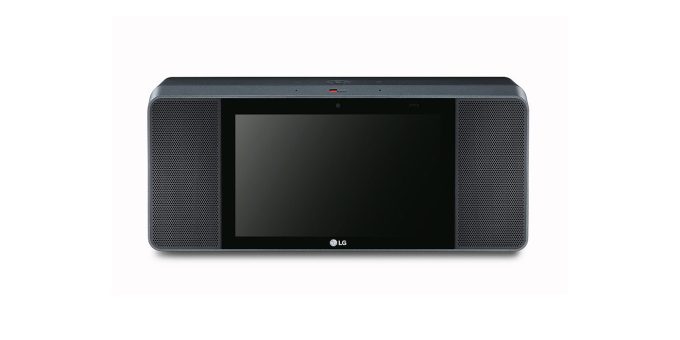
Sound-wise, this speaker is also much better than I was expecting for its small footprint. It seems louder and crisper than the standard Google Home falling short of those metrics when compared to the pricier Max though you are also certainly getting less speaker for your money than a comparably-priced (but screen-less) product like the Sonos One. Both JBL and LG also have Smart Display products in the pipeline that seem to place more of an emphasis on powerful sound, but the whole boombox look that they have going on just doesn’t do it for me.

There were a couple of hardware quirks with Lenovo’s Smart Display, but really nothing major. I wasn’t generally getting the greatest viewing angle from the device on my kitchen counter so some sort of hinge on the stand would have been nice to adjust the angle of the screen. The device’s ability to be viewable in both portrait and landscape was interesting but you can really only use it in portrait for Duo calls as Google doesn’t really seem to want the Smart Display to be used in that orientation. The touchscreen was also at times a little less responsive than I would have liked but fared well enough by and large.

Lenovo’s Smart Display is very pretty and offers some interesting ideas from Google. It strangely doesn’t feel like a huge upgrade over its screen-less Google Home variants but with pretty decent sound and a few nice visual feedback features there are some very novel ideas present even if they don’t feel entirely fleshed out.


Source: TechCrunch http://j.mp/2JYsAgp