Wednesday, June 26, 2019

YouTube update gives users more insight and control over recommendations

YouTube today announced a series of changes designed to give users more control over what videos appear on the Homepage and in its Up Next suggestions — the latter which are typically powered by an algorithm. The company also says it will offer more visibility to users as to why they’re being shown a recommended video — a peek into the YouTube algorithm that wasn’t before possible.

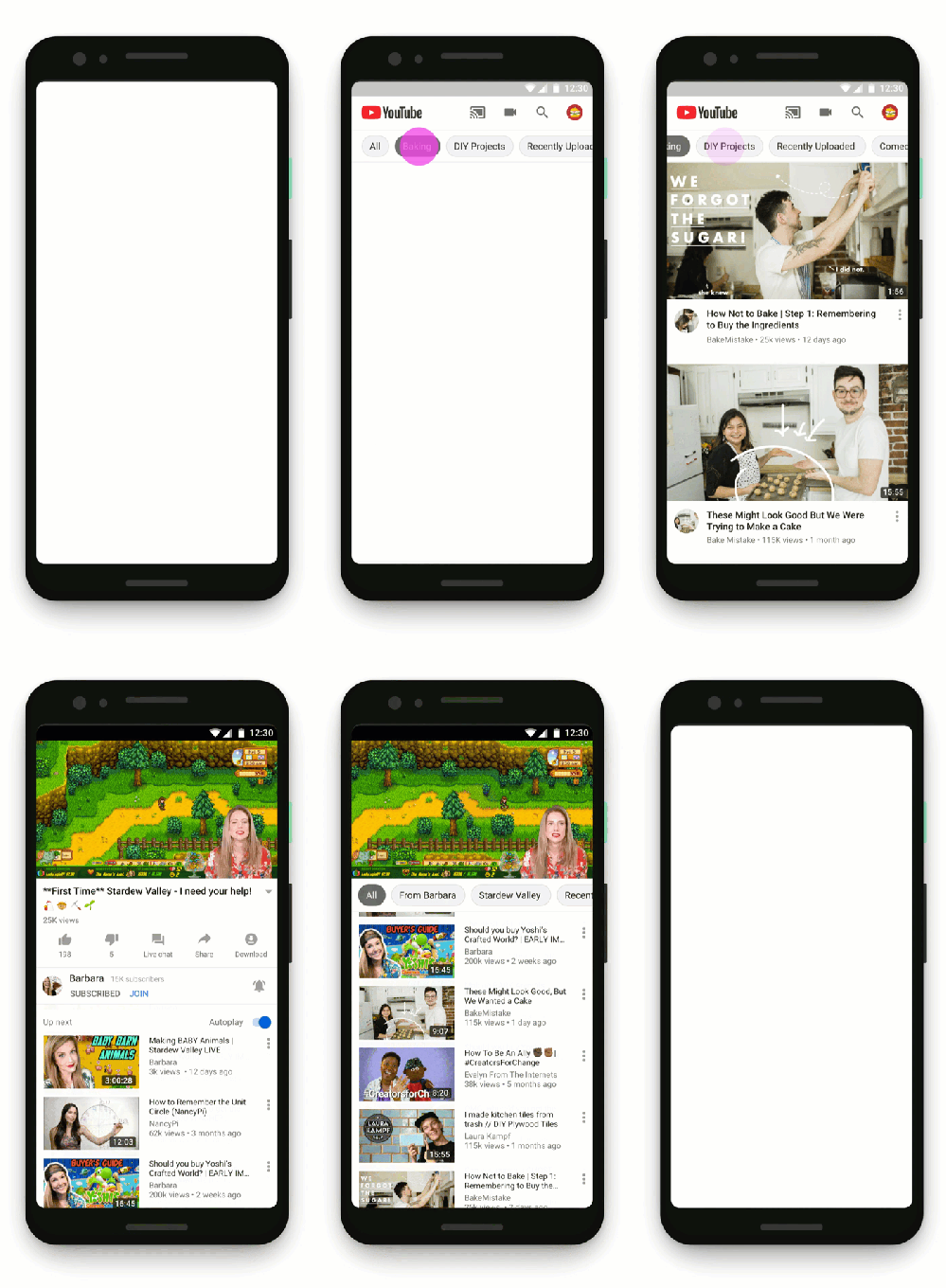
One new feature is designed to make it easier to explore topics and related videos from both the YouTube Homepage and in the Up Next video section. The app will now display personalized suggestions based on what videos are related to those you’re watching, videos published by the channel you’re watching, or others that YouTube thinks will be of interest.
deviceFrame combined

This feature is rolling out to signed-in users in English on the YouTube app for Android and will be available on iOS, desktop and other languages soon, the company says.

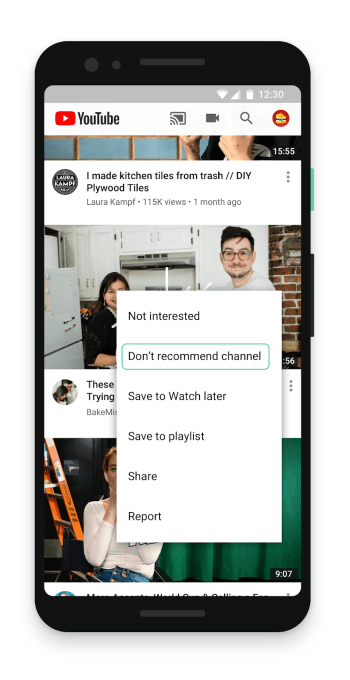
If YouTube’s suggestions aren’t right, users will now be able to access controls that explicitly tell the service to stop suggesting videos from a particular channel.

This will be available from the three-dot menu next to a video on the Homepage or Up Next. From there, you’ll click “Don’t recommend channel.” From that point forward, no videos from that channel will be shown. However, you’ll still be able to see the videos if you Subscribe, do a search for them, or visit the Channel page directly — they aren’t being hidden from you entirely, that is. The videos may also still appear on the Trending tab, at times.
dontRecommend featureImage 3

This feature is available globally now on the YouTube app for Android and iOS starting today, and will be available on desktop soon.

Lastly, and perhaps most notably, is that YouTube is giving users visibility into how its algorithm works.

Before, people may not have understood why certain videos were recommended to them. Another new feature will detail the reasons why they made the list.

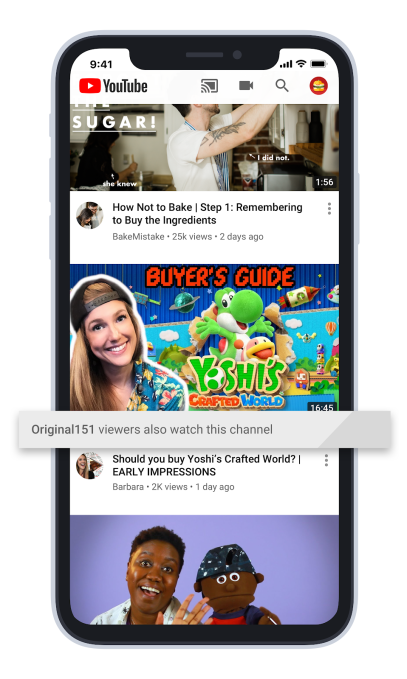
Now, underneath a video suggestion, YouTube will say why it was selected.

“Sometimes, we recommend videos from channels you haven’t seen before based on what other viewers with similar interests have liked and watched in the past,” explains the company in its announcement. ” Our goal is to explain why these videos surface on your homepage in order to help you find videos from new channels you might like,” says YouTube.

For example, the explanation might say that viewers who also watch one of your favorite channels also watch the channel that the video recommendation is coming from. YouTube’s algorithm is likely far more complex that just “viewers who like this also like that,” but it’s a start, at least.
endorsements featureImage iphone 1

This feature is launching globally on the YouTube app for iOS today, and will be available on Android and desktop soon.

The changes come at a time when YouTube — and other large social media companies — are under pressure from government regulators over how they manage their platforms. Beyond issues around privacy and security, the spread of hate speech and disinformation, platform providers are also being criticized for their reliance on opaque algorithms that determine what is shown to their end users.

YouTube, in particular, came under fire for how its own Recommendations algorithm was leveraged by child predators in the creation of pedophilia wormhole. YouTube responded by shutting off the comments on kids’ videos where the criminals were sharing timestamps. But it stopped there.

“The company refused to turn off recommendations on videos featuring young children in leotards and bathing suits even after researchers demonstrated YouTube’s algorithm was recommending these videos to pedophiles,” wrote consumer advocacy groups in a letter to the FTC this week, urging the agency to take action against YouTube to protect children.

The FTC hasn’t commented on its investigation, as per policy, but confirmed it received the letter.

Explaining to end users how Recommendations work is only part of the problem. The other issue that YouTube’s algorithm can end up creating “filter bubbles,” which can lead users to down dark paths, at times.

For instance, a recent story in The New York Times detailed how a person who came to YouTube for self-help videos was increasingly shown ever more radical and extremist content, thanks to the algorithm’s recommendations which pointed him to right-wing commentary, then to conspiracy videos, and finally racist content.

The ability to explicitly silence some YouTube recommendations may help those who care enough to control their experience, but won’t likely solve the problem of those who just follow the algorithm’s suggestions. However, if YouTube were to use this as a new signal — a downvote of sorts — it could influence the algorithm in other more subtle ways.


Source: TechCrunch http://j.mp/2XaI7VP

Low-cost TV streaming service Philo comes to Android

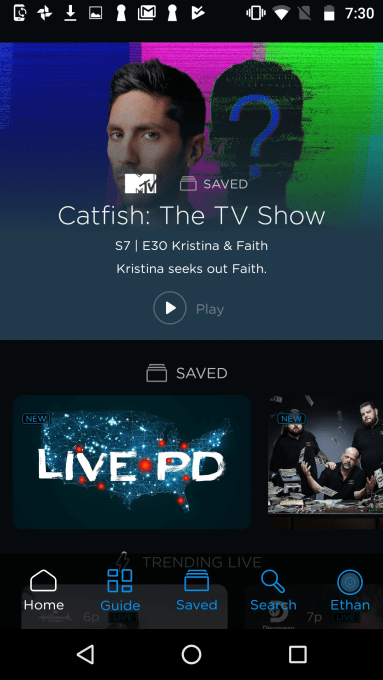
Despite a slight price increase in April, Philo’s live TV streaming service is still one of the more affordable options on the market because of its strategic decision to not stream sports. That helps keep its costs down while providing an option for cord cutters who mainly want access to the traditional cable TV networks focused on entertainment, news, movies, kids, and other lifestyle content. But until today, Philo hasn’t been well-serving a large portion of its user base: Android users. That’s now changing with the official launch of a native Android app.

Before, Android users could only access Philo from a mobile web browser, while iOS users had their own dedicated app.

Android Home Page

The new Android app will be generally comparable to the iOS experience, though it has a somewhat different layout.  While iOS features navigation buttons for Home, Live, Saved, Search, and Settings, the Android version switches things up a bit. Instead, its navigation features Home, Guide, Saved, Search, and a user profile button.

Android Recommended

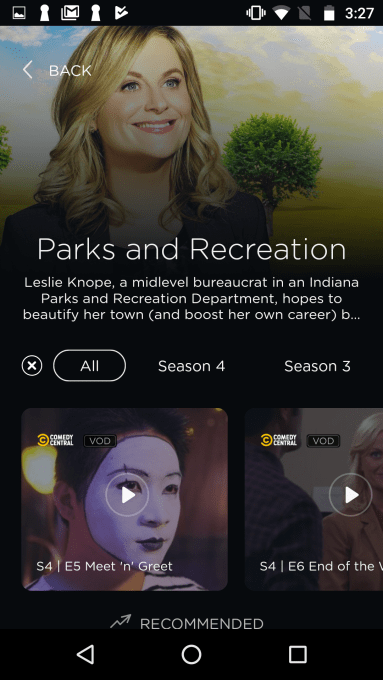
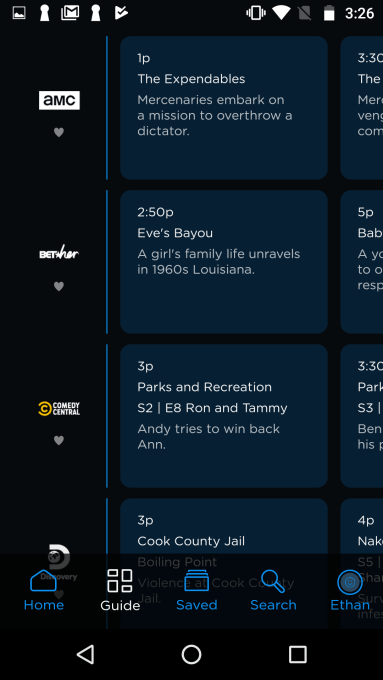
It also includes a Recommended section, in addition to the Trending Live and New and Upcoming sections. And instead of row of thumbnails in iOS’s Live, it presents a grid-like TV guide for finding something to watch in Guide. Many of the live TV services have switched over to the grid guide format, having realized that when it comes to finding live content, people still prefer to see things organized by what’s on now in a more standard layout.

Schedule Screenshot

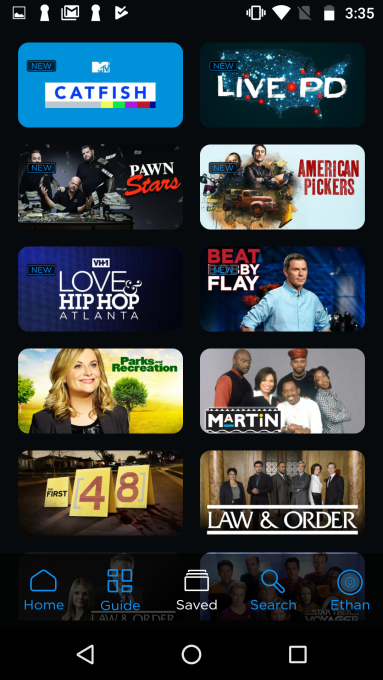
Philo users can choose to either watch TV live or save shows to watch later, on up to three devices. The company recently did away with its multiple tiered pricing to combine packages into a single $20 per month option with 58 channels.

In addition to the Android native app, Philo is also today launching an app for Amazon’s Fire tablets (Fire OS 5 and up).

Android Saved Channels

These new apps join Philo’s existing lineup of apps for web (Chrome, Safari, Edge, and Firefox); TV (Amazon Fire TV, Apple TV, and Roku); and iOS.

The company doesn’t disclose its subscriber numbers, but its app is much further behind its rivals. Today, the iOS version ranks No. 153 on the App Store’s Entertainment category. That’s behind live streaming TV services YouTube TV (No. 22), Sling TV (No. 68) and No. 2 Hulu — although the latter is top-ranked for its more popular on-demand product, not its live TV service.

That said, Philo had been missing out on a reaching huge swath of potential customers until today. Now available cross-platform, it may better appeal to consumers who use multiple devices — as well as those who are budget conscious and own less expensive Android smartphones.

The app is available here on Google Play.


Source: TechCrunch http://j.mp/2YgopEr

Tuesday, June 25, 2019

Huawei says two-thirds of 5G networks outside China now use its gear

Facebook may finally let you turn off those annoying notification dots

Sick of those anxiety-inducing red dots constantly appearing on the Groups, Watch, or other tabs in your Facebook app? Well the social network may be easing up a little in its unending war for your attention. Facebook is now testing a toggle to turn off the red in-app notification dots on its homescreen. Until now you had to manually open each of Facebook’s features to extinguishing the maddening flame of the notification badge. This could make Facebook feel more tranquil, and keep you focused on whatever you actually opened the app to do.

“It’s related to the work we’re doing with the well-being team. We’re thinking about how people spend their time in the app and making sure that it’s time well spent” a Facebook spokesperson tells me. Many people can’t feel settled if there are red dots begging to be tapped — a psychological quirk Facebook takes advantage of. The company seems to be realizing that its growth hacking can backfire if its pleas for engagement actually deter us from opening its app in the first place.Turn Off Facebook Notification Dots

The Facebook Notification Dots setting was first spotted in its prototype form by reverse engineering specialist Jane Manchun Wong, hidden in the Android app’s code earlier this summer. Today, social media consultant Matt Navarra noticed the feature being publicly tested. Facebook now confirms to TechCrunch that this is a new global test that started recently on iOS and Android for a subset of users. “We are testing new ways to give people more control over the notifications they receive in the Facebook app” a spokesperson tells me.

Facebook plans to continue offering additional ways to personalize notifications so you don’t miss what’s important but aren’t drowned in noise. “People don’t necessarily want to see a notification on the badge [the in-app dots on tabs] if they’re already getting notifications in the jewel [the red counter on the Facebook app icon on your phone’s homescreen]” the spokesperson tells me. It considered a snooze option but went with an on/off switch that’s the least confusion. The Notification dots feature is likely to roll out to everyone unless it suddenly proves to decimate Facebook usage.

Facebook Notification Dots

How To Turn Off Facebook Notification Dots

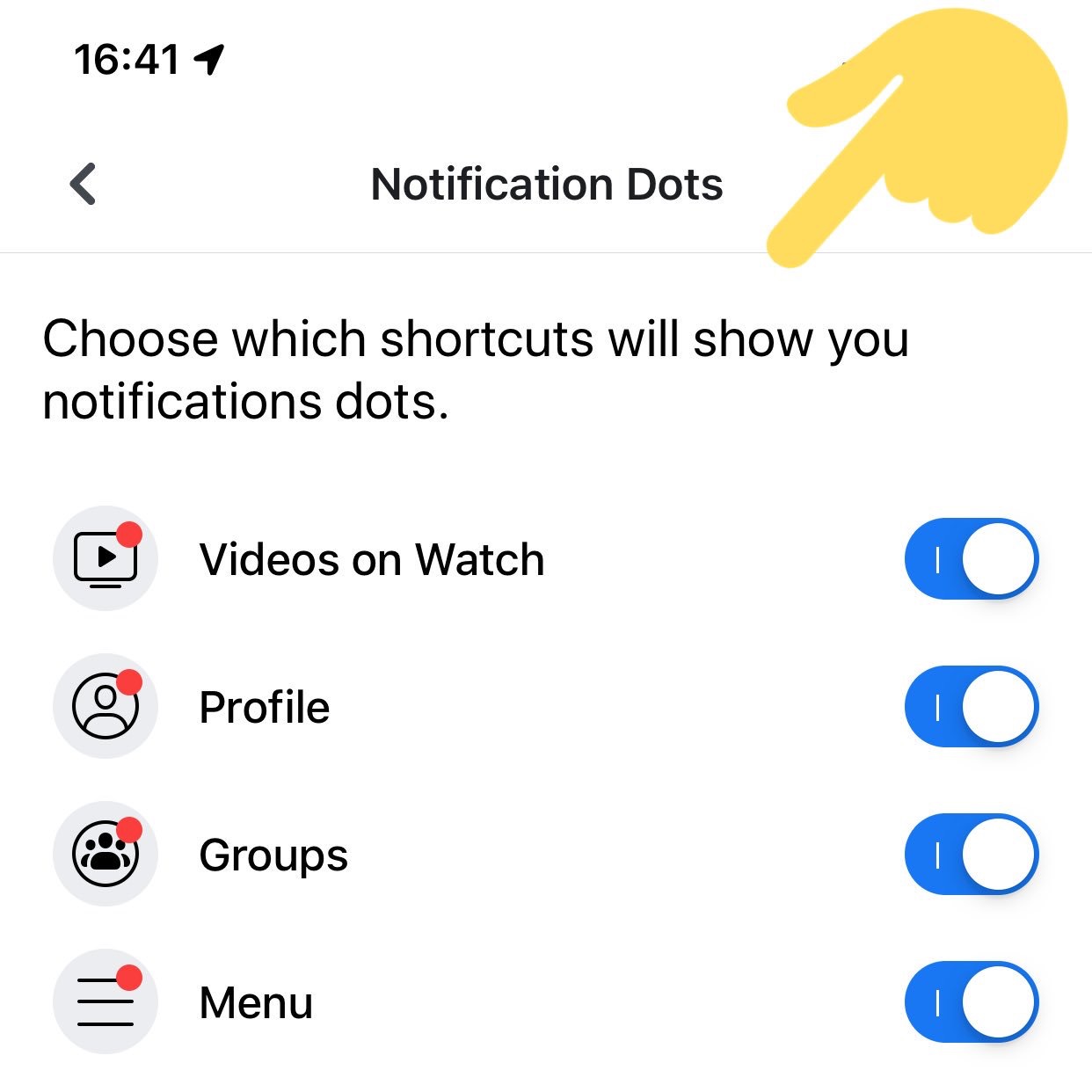
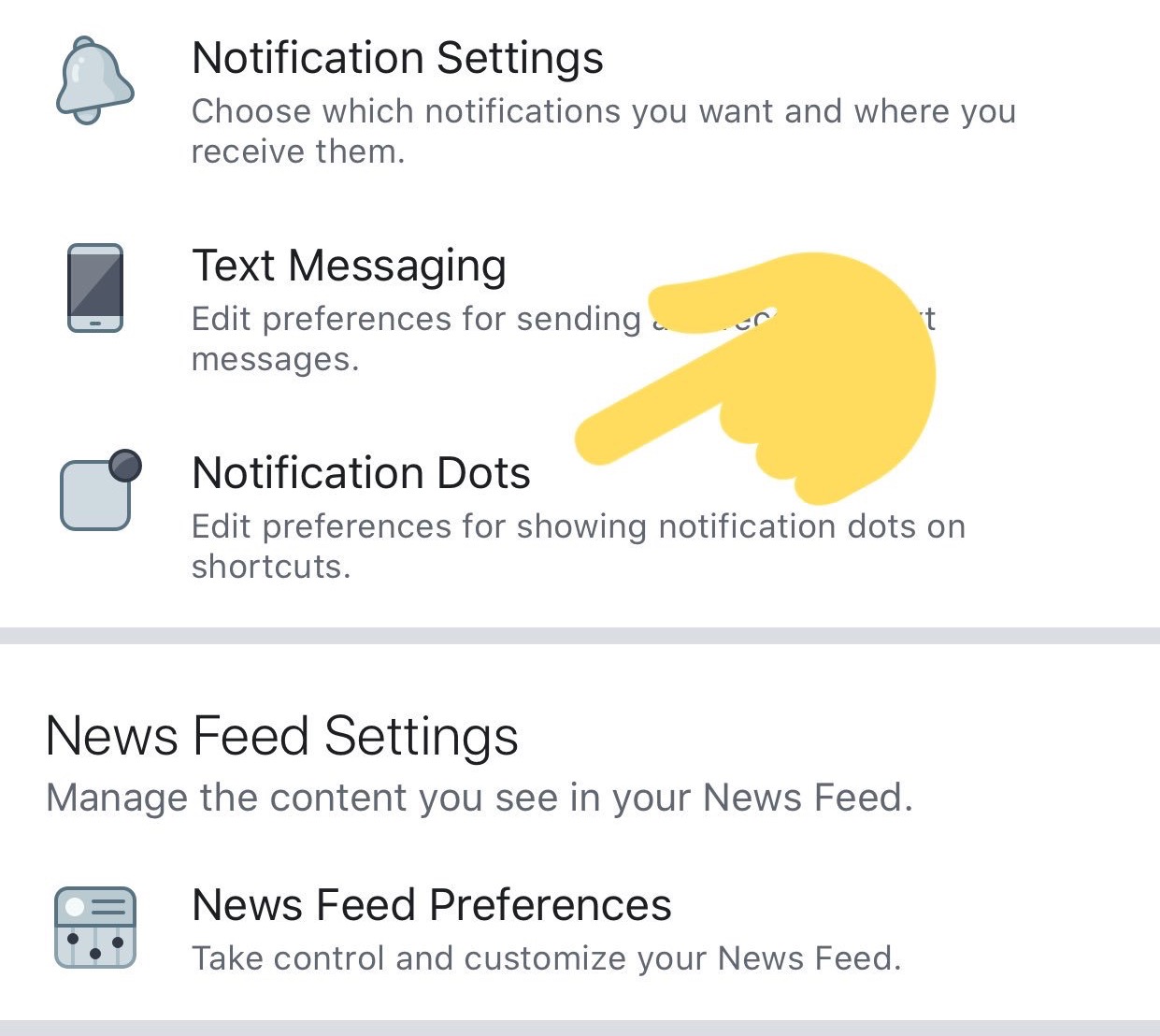
If you have access to this feature test, you’ll find the option in your Facebook app under the three-lined More/Menu tab -> Settings & Privacy -> Settings -> Notifications -> Notification Dots. There you can “Choose which shortcuts will show you notifications dots” with options for “Videos On Watch”, “Profile”, “Groups”, “Menu”.

One tab/shortcut where you can’t disable the dots is Notifications, which actually makes sense since that’s the main way the app alerts you to activity around your profile and content. But since you already get a heads-up about new Groups posts or when you’re tagged in a photo there, the notification dots on the other tabs are just redundant and distracting.

Facebook notification settings

If you want to control which activities trigger alerts in your Notifications tab, you can go to More/Menu tab -> Settings & Privacy -> Settings -> Notifications -> Notification Settings -> Mobile. There you can see a list of your recent notifications and turn off ones like it in case you’re sick of hearing about friends starting fundraisers, reminders about upcoming events, or comments after yours on a Group post. The Notification Settings page also lets you turn off sound for Facebook notifications, axe them from specific groups or other apps, turn down the frequency of On This Day alerts, and choose what notifications get bumped up to email or text message.

Confusingly, there’s also a totally separate menu that’s accessible from the Notifications tab’s settings gear icon. There you can temporarily or permanently mute push notifications and choose where you receive each type. Obviously there should be a link between these two different spaces. A great next step for Facebook would be allowing user to batch notifications, Instead of either being constantly pestered or totally in the dark, it could let users opt for an occasional digest of notifications, like once per day or when they get to 10 alerts.

Facebook and Instagram Your Activity Counter

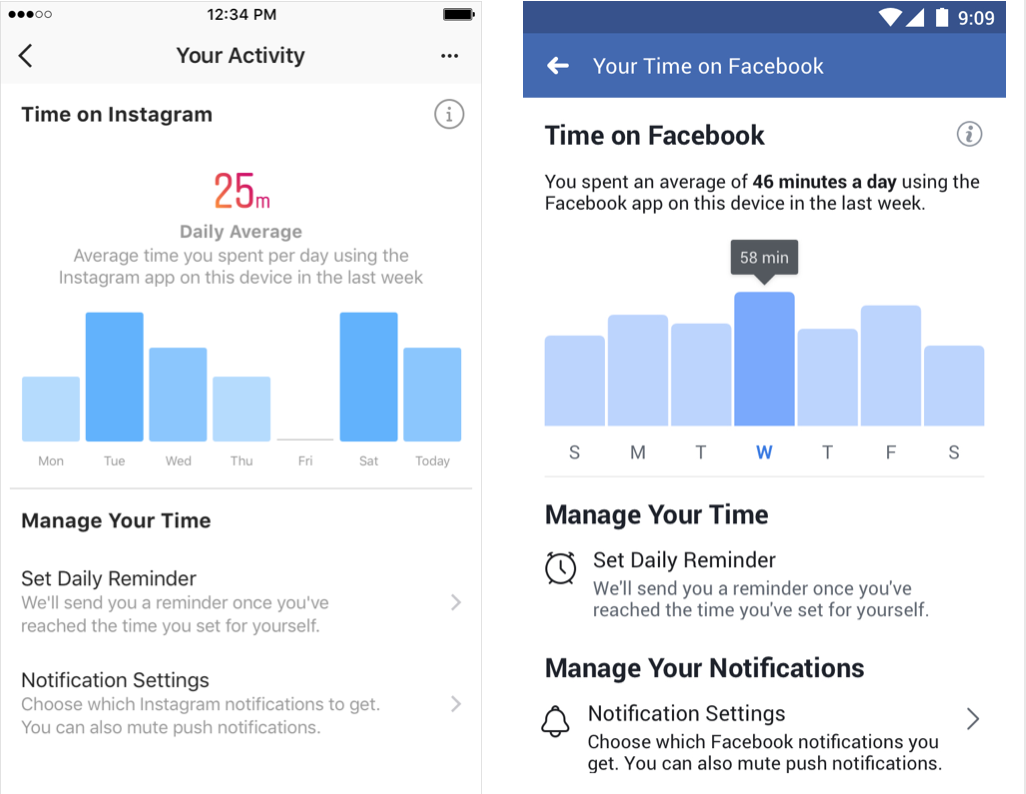
A year ago Facebook trumpeted how it launched a Time Well Spent dashboard in its app and Instagram for showing how long per day you use the apps with an option to set a reminder to stop after enough minutes. But buried inside Menu -> Settings & Privacy -> Your Time on Facebook, the toothless feature we’d previously scooped isn’t doing much good. If Facebook wants to be a principled citizen of our devices, it shouldn’t be so hard to say when we do or don’t want to be nagged for attention.


Source: TechCrunch http://j.mp/2RyAQJf

Google Drive beta test expands offline support to non-Google files in Chrome

Google Drive’s offline capabilities are getting an upgrade. Currently, you can use Google Chrome to make your Docs, Sheets, and Slides available offline. On Tuesday, the company announced the launch of a beta test that will expand offline capabilities to other content as well, including PDFs, images, Microsoft Office files, and other non-Google file formats.

The beta test, dubbed the “Google Drive Offline for Binary Content Beta,” is only open to admins of G Suite domains who have Drive File Stream enabled. Admins who had previously opted into the Alpha test for offline Docs, Sheets, and Slides will be automatically whitelisted for this new beta, Google notes.

Though the beta is limited for now, if Google is able to work out the bugs and ensure the stability of this new set of capabilities, it would naturally want to roll out support more broadly across not just its G Suite user base but to the consumer version of Google Drive, too.

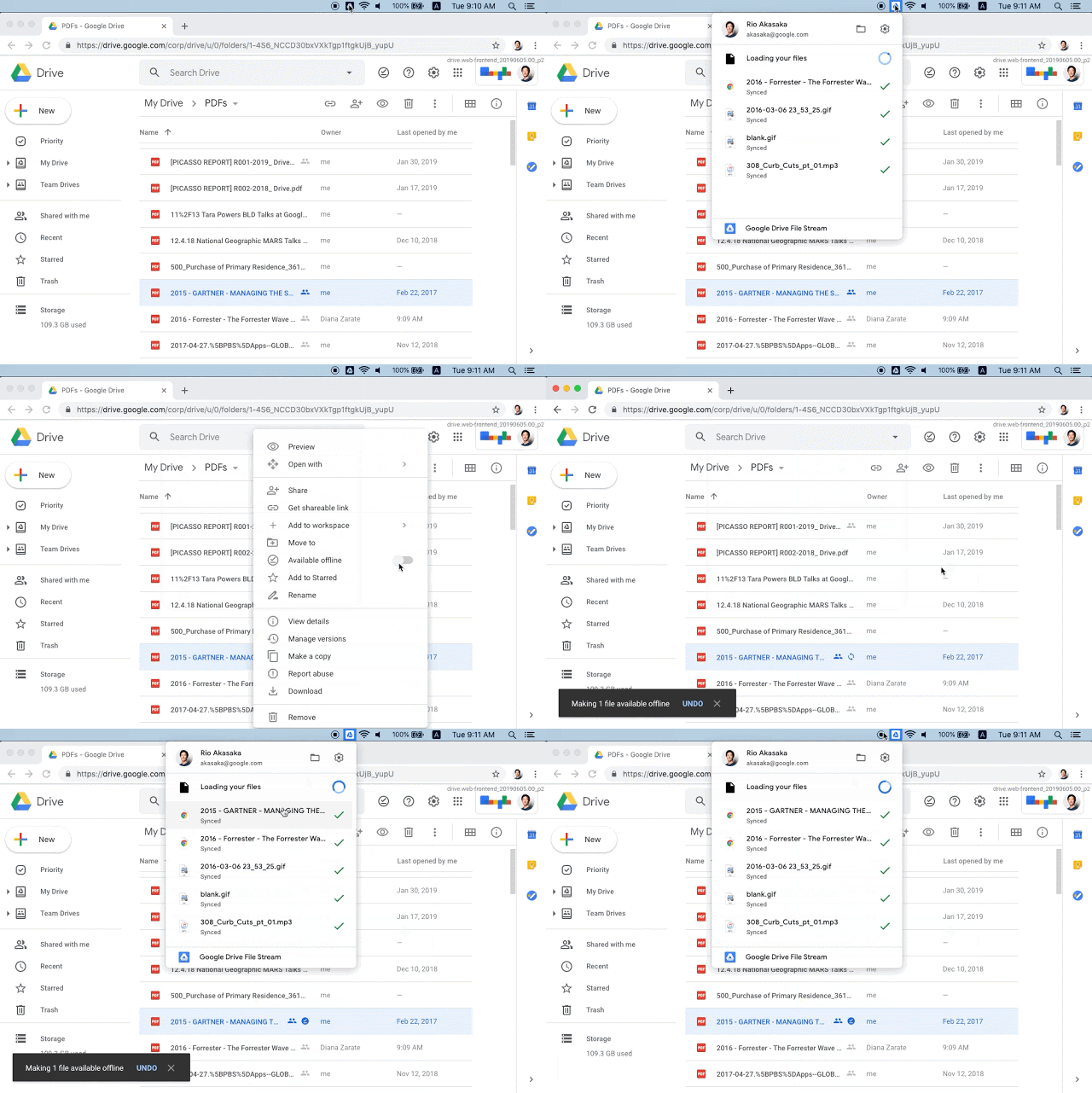
Once the G Suite domain is enrolled, users will be able to enable offline from within the Drive or Docs settings, then sign into Chrome and right-click on files, then check “Make available offline.”

Offline preview will also work, once enabled. Plus, users are able to right-click and open the non-Google files in native applications, like Microsoft Office, to make them available offline.

ChromeOS isn’t currently supported in the beta, but it will be in the future, Google says.

The new beta addresses one of Google Drive’s more notable issues, especially in the workplace. A variety of work documents are not in Google file formats, and much of that work does need to be more easily available offline when employees are traveling and have limited connectivity. For now, users can sync their Google Docs, Sheets, Slides and Drawings files offline, or download files directly to their device. They can also use desktop client applications as a sync solution, if preferred.

Meanwhile, Google Drive competitor Dropbox is moving forward as an enterprise collaboration workspace, which even allows users to launch apps with shortcuts for G Suite, and more — including offering integrations with Zoom and Slack. Essentially, it’s becoming a portal to work tools instead of just a file storage platform.

G Suite has yet to kill Microsoft Office, which has 180 million monthly actives for Office 365 commercial. (Google says G Suite had 5M organizations as clients by year-end 2018). And on the consumer side, iCloud Drive is getting an upgrade in the new version of macOS, which will now support folder sharing in addition to file sharing — a much-needed feature that could convince more casual customers of Drive or Dropbox to make the switch.

Google didn’t say how long the best would run before public availability.

Android Police was first to spot the beta test, also noting the limitation in being a Chrome-only feature could still be an issue.


Source: TechCrunch http://j.mp/2ZJSDjp

Monday, June 24, 2019

Report: Microsoft Is Cooking Up a Dual-Screen Surface With Support for Android Apps

Computer makers have been dreaming about dual-screened laptops for a long time. Microsoft got the hype started nearly a decade ago with the Courier, a rumored dual-screen tablet that at some point was in development but never got an official release. Now in 2019, it seems the idea behind the Courier has come full…

Read more...


Source: Gizmodo http://j.mp/2X4n0UN

Trash uses AI to edit your footage into a fun, short videos

Sunday, June 23, 2019

A Narwhal-Beluga Hybrid, Hong Kong Protests, and Jean-Luc Picard: Best Gizmodo Stories of the Week

Another week, another crisis—The U.S. is reportedly launching cyberattacks on assets tied to Iran’s Revolutionary Guard Corps, including a group of hackers believed to spy on ships passing through the Gulf of Oman and on computer-controlled rocket and missile launchers, in retaliation for a series of allegedly…

Read more...


Source: Gizmodo http://j.mp/2Ru7UlD

Saturday, June 22, 2019

Bill Gates on making “one of the greatest mistakes of all time”

At a recent event hosted for founders by the venture firm Village Global, one of its most prominent investors, Bill Gates, sat down with Eventbrite cofounder and CEO Julia Hartz to discuss founding a company and the tough decisions necessary at nearly every turn in order to create and sustain a thriving enterprise.

As part of that conversation, Hartz asked Gates about his views on work-life balance, and whether they have evolved from an earlier point in Gates’s life, when he has said that he “didn’t really believe in vacations.” His reply, in short: no, not in a company’s earliest years and especially not if that company is building a software platform. As Gates told Hartz, “I have a fairly hardcore view that there should be a very large sacrifice made during those early years, particularly if you’re trying to do some engineering things that you have to get the feasibility” or proof that a project can be performed successfully.

In fact, Gates is still kicking himself for taking his eyes off the ball and allowing Google to develop Android, the “standard non-Apple phone form platform,” as he describes it. “That was a natural thing for Microsoft to win.”

You can find their entire chat below, but here’s Gate’s full response to whether he thinks it worth it to focus narrowly on work or whether early-stage founders can strike a better balance:

I think you could over worship and mythologize the idea of working extremely hard. For my particular makeup — and it really is true that I didn’t believe in weekends; I didn’t believe in paid cases; I mean, I knew everybody’s license plate so I could tell you over the last month when their card had come and gone from the parking lot — so I don’t recommend it and I don’t think most people would enjoy it.

Once I got into my 30s, I could hardly even imagine how I had done that. Because by then, some natural behavior kicked in, and I loved weekends. And, you know, my girlfriend liked vacations. And that turned out to be kind of a neat thing. Now I take lots of vacation. My 20-year-old self is so disgusted with my current self. You know, I, I was sure I would never fly anything but coach and you know, now I have a plane. So it’s very much counter revelations and taken place at high speed.

But yes, it is nice if during those first several years, you have a team that has chosen to be pretty maniacal about the company, and how far that goes, you should have a mutual understanding, so you’re not one person expecting one thing, and another person expecting another thing.

And you’ll have individuals who, who have, you know, health or relatives or things that [distract them]. But yes, I have a fairly hardcore view that there should be a very large sacrifice made during those, those early years, particularly if you’re trying to do some engineering things that you have to get the feasibility.

You know, in the software world, in particular for platforms, these are winner-take-all markets. So, you know, the greatest mistake ever is the whatever mismanagement I engaged in that caused Microsoft not to be what Android is, [meaning] Android is the standard non-Apple phone form platform. That was a natural thing for Microsoft to win.

It really is winner take all. If you’re there with half as many apps or 90% as many apps, you’re on your way to complete doom. There’s room for exactly one non-Apple operating system, and what’s that worth? $400 billion that would be transferred from company G [Google] to company M [Microsoft].

And it’s amazing to me, having made one of the greatest mistakes of all time — and there was this antitrust lawsuit and various things that, you know, our other assets, Windows, Office,  are still very strong. So we are a leading company. If we got that one right, we would be the company. But oh well.

So this idea that just small differences can magnify themselves doesn’t exist for a lot of businesses. You know, if you’re a service business, it doesn’t exist. But for software platforms, it’s absolutely gigantic. And so that’s partly where you have the mentality of every night you think, ‘Am I screwing this up?’ And eventually, we did screw up a super important one.


Source: TechCrunch http://j.mp/2ZFSMnX

The New Service Wars Are Here to Suck Your Wallet Dry

Canon versus Nikon. Dell versus HP. Microsoft versus Apple. Tech companies have been battling over their piece of the pie for years, that ain’t new. But recently, tech and non-tech companies alike have started changing up their business models so that instead of simply selling you a device and calling it a day,…

Read more...


Source: Gizmodo http://j.mp/2IYQxFR